
Quote retweet management is the deliberate process of publishing, monitoring, and responding to quote posts on X so they build reach instead of chaos. The core principle: treat every quote retweet as owned content worth triaging, not noise to ignore. Start by monitoring quote activity on your highest-priority posts daily, then decide fast whether to amplify, reply, or escalate.
TL;DR:
- Automate quote retweet alerts for engagement thresholds, while manually crafting commentary and responses to maintain authenticity and credibility.
- Use specific quote formats like contrarian takes or data add-ons rather than generic comments to significantly increase reply rates and profile clicks.
- Respond within two hours to amplification and support quotes, and escalate correction or controversy cases within four hours to prevent escalation.
- Focus on key KPIs such as profile clicks, engagement, referral followers, and conversions, tagging links with UTM parameters for accurate attribution.
- Shift resources from simple monitoring to intentional quote post amplification during launches to maximize reach and growth on X.
Table of Contents
- What Is a Quote Retweet, and When Should You Use One?
- Quote Retweet Formats That Actually Get Replies
- How Do You Triage Incoming Quote Retweets?
- Which Tools Handle Quote Retweet Monitoring and Publishing?
- What KPIs Prove Quote Retweet Management Is Working?
- A Practitioner’s Playbook for Quote Retweet Wins
- Quote Retweets Are a Growth Lever, Not Just Moderation
- Nowix Turns Quote Retweets Into a Controlled Growth Channel
- Sources
What Is a Quote Retweet, and When Should You Use One?
A quote retweet, now officially called a quote post on X, wraps your own commentary around someone else’s post and publishes it as new content on your profile. That distinction matters mechanically: unlike a plain repost, a quote post creates a new post that notifies the original author and accumulates its own likes, replies, bookmarks, and views credited to your account, not theirs.
On desktop, click the repost icon under any post and select “Quote.” On mobile, tap the same icon and choose “Quote” from the menu that pops up. Either way, your comment appears above the embedded original, and the original author gets a notification the moment you publish. One technical wrinkle worth knowing: you cannot quote a post from a protected account, so check visibility settings before you build a campaign around someone else’s content.
The harder question is when to use a quote post instead of a reply or a plain repost. Use this decision framework:
- Quote it when you have a genuine take, a data point, or a contrarian angle that adds something the original didn’t say.
- Reply when your comment only makes sense in the context of that specific thread and has no value standing alone.
- Repost plainly when you agree completely and have nothing to add.
Run every draft through what practitioners call the minimum bar test: would this stand as a good post on its own if the embedded tweet vanished tomorrow? If the answer is no, you’re padding, not commenting, and it will read that way to followers scrolling past.
Quote Retweet Formats That Actually Get Replies
Generic commentary like “This!” or “Great point” gets ignored by the algorithm and by humans. Practitioner-tested formats work because they give readers a reason to stop and respond, and specific formats such as contrarian takes and data add-ons consistently drive more replies and profile clicks than vague agreement.
Five formats consistently outperform generic commentary:
- Here’s why this matters. Explain the second-order consequence the original poster didn’t mention. Template: “Everyone’s focused on [surface point]. The real shift is [deeper implication].”
- Contrarian take. Push back on a popular opinion with a specific reason. Template: “Disagree. [Claim], and here’s what the data actually shows.”
- I tried this. Add a firsthand result or observation. Template: “Tested this last week. [Specific outcome], which surprised me.”
- Data add-on. Attach a number, benchmark, or source the original lacked. Template: “Worth adding: [stat or source]. Changes how I read this.”
- Evolved take. Build on the idea with where it’s heading next. Template: “This is right for now. In six months, [prediction] becomes the bigger story.”
Add media when you can. Quote posts paired with an image or short video tend to outperform text-only versions for likes and profile clicks, especially when the media is a screenshot of your own data or a short clip demonstrating a claim.
For B2B and AI audiences, specificity beats cleverness every time. Name the metric, the tool, or the exact use case instead of hedging with vague enthusiasm.
Pro Tip: End your quote post with a direct question rather than a period. It filters for the exact audience you want replying and gives the algorithm a reason to surface the thread.
How Do You Triage Incoming Quote Retweets?
Once your brand starts getting quoted regularly, the inbound flow needs a system, not vibes. Sort every incoming quote post into one of four buckets the moment it lands:
- Amplify: a well-followed account added genuine insight or praise. Reply fast, then consider quoting their quote to extend the loop.
- Support inquiry: a customer question disguised as commentary. Route to support within the hour, don’t leave it hanging on the timeline.
- Correction or controversy: someone got a fact wrong, or the take is drawing heated replies. Draft a calm, factual response and loop in a manager before posting.
- Abuse or bad faith: mute, don’t engage, and document if it violates platform rules.
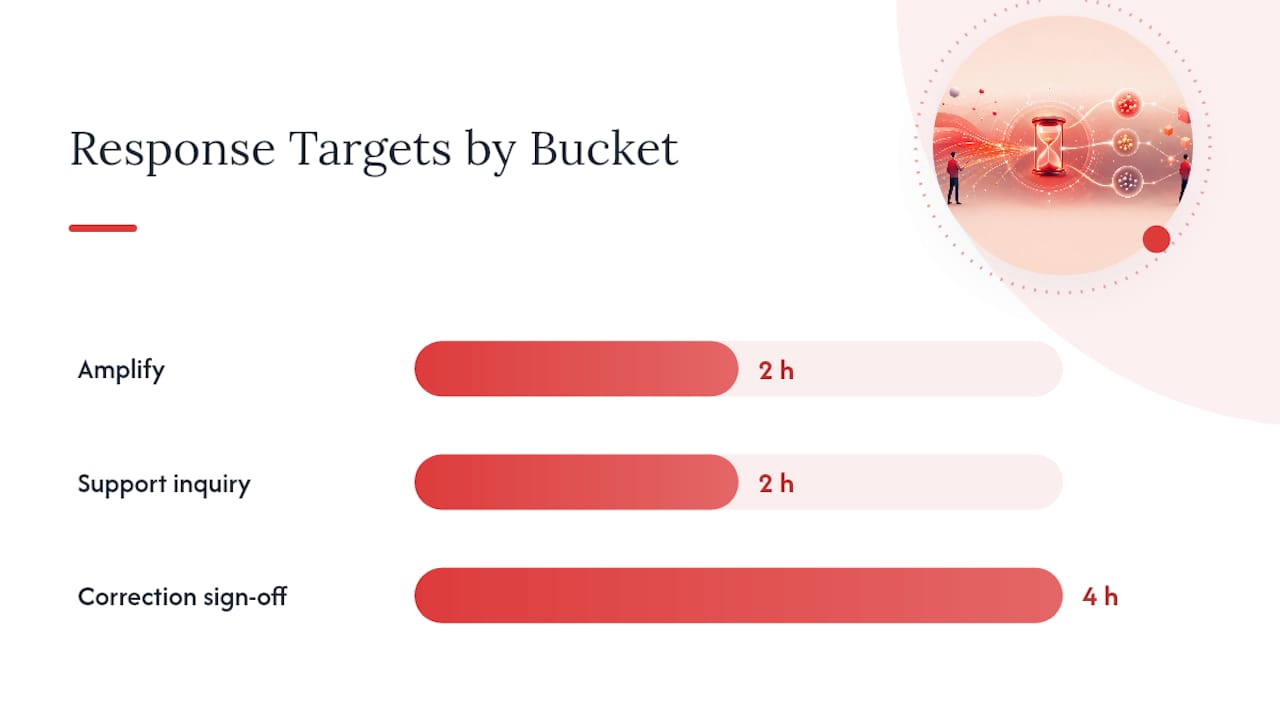
A workable service-level target: acknowledge amplify and support cases within two hours during business hours, and get a leadership sign-off on any correction within four hours before it snowballs. Best-practice guidance from platform veterans is consistent here: add real value, credit the original poster, and never punch down at smaller accounts when you respond or requote.
Keep response templates short and human. For amplify cases: “This is exactly the use case we built for. Appreciate you flagging it.” For corrections: “Appreciate the catch. To clarify: [fact]. Updated our post to reflect this.” Escalate anything involving legal exposure, executive mentions, or press attention straight to a human decision maker, never a canned reply.
Pro Tip: Build a shared doc with five pre-approved response templates per bucket. Speed matters more than originality when a quote post is gaining traction in real time.
Which Tools Handle Quote Retweet Monitoring and Publishing?
Four tool categories cover most quote retweet workflows: social suites for publishing and team inboxes, monitoring platforms for real-time alerts, browser extensions for quick manual checks, and archive or search tools for pulling historical quote activity during a campaign review.
Enterprise suites like Sprinklr let teams publish quote posts directly from a scheduling dashboard and route incoming ones through a shared team inbox, which matters once more than one person is responding on your brand’s behalf.
Automate the parts that don’t need judgment:
- Automate: alerts when a post crosses an engagement threshold, keyword watchlists for your brand name and product terms, and daily digest reports.
- Keep manual: the actual commentary, any correction, and anything touching a customer complaint.
Automation should surface candidates for a human to quote, not post quotes automatically, since mass-automated quoting reads as spam and damages the account’s credibility fast. When evaluating a platform, prioritize a shared team inbox, keyword and mention filters, and quote-specific alerts that separate quote posts from plain replies. That distinction alone saves hours of manual sorting.
What KPIs Prove Quote Retweet Management Is Working?
Five metrics matter more than the rest: profile clicks, engagement on the quote post itself (replies, likes, bookmarks), referral followers gained within 48 hours, total reach or impressions, and downstream conversions where you can trace them.
Attribution gets easier with a little structure upfront. Tag any link in your quote posts with UTM parameters, and use a consistent tracked CTA (a specific landing page or sign-up link) so conversions trace back to the exact post that drove them.
Build two reporting layers:
- Weekly dashboard: raw numbers per quote post, top-performing format, and any triage escalations.
- Monthly summary for leadership: trend direction, one standout example, and a single recommendation for the next month.
One caution worth building into every report: aggregated research across dozens of studies found quote tweeting doesn’t automatically outperform other formats, it depends heavily on commentary quality and fit with your account’s usual content. Report the trend, not the tactic, as the win.
A Practitioner’s Playbook for Quote Retweet Wins
One tech brand launch we’ve observed followed a simple pattern: seed a product announcement, then apply the “data add-on” format across the first wave of quote posts responding to it, pairing each with a screenshot metric. Profile clicks on the launch thread outpaced the brand’s typical weekly average within 48 hours.
Three quick wins to test in the next seven days:
- Apply the contrarian format to one industry news item your audience already follows.
- Add a tracked CTA to your next three quote posts and compare click rates.
- Set a two-hour response SLA for amplify-bucket quotes and measure the reply rate.
Quote Retweets Are a Growth Lever, Not Just Moderation
Most brands treat quote retweets as a cleanup task: something to monitor so nothing embarrassing slips through. That’s backwards. During product launches or major announcements, shift real headcount toward QT-led amplification, not just triage. The brands winning attention on X aren’t reacting to quotes. They’re engineering the ones worth having.
— Knowix
Nowix Turns Quote Retweets Into a Controlled Growth Channel
Running this playbook well takes daily attention: triaging quotes within hours, matching the right format to the right moment, and reporting results leadership actually trusts. Nowix builds that muscle for tech and AI brands directly, coordinating vetted micro-creators to quote and comment on your key posts with commentary that reads as genuine, not scripted.

If you’re running a product launch, Nowix’s timeline takeover campaigns coordinate up to 700 creators within a one-hour window to generate the exact kind of quote activity this article walks through, minus the manual triage. For ongoing brand presence, organic post amplification keeps controlled quote retweets flowing from vetted accounts between launches. Hire Nowix when the volume outpaces your in-house bandwidth or a launch date is fixed and can’t slip. Get in touch to scope your next campaign and see which service fits your calendar.
Sources
- Quote Tweeting: Over 30 Studies Dispel Some Myths
- How to Quote Tweet on X in 2026: Complete Guide - Tweet Archivist
- X Quote Tweet Strategy: How to Get Reach in 2026
Recommended
- Quote Tweet vs Retweet: Key Differences Explained
- Twitter Trending Strategy 2026: The Engineered Playbook for Tech Brands
- Tech Startup Announcement Strategy: Engineering a Timeline Takeover on X
- How to Increase Twitter Engagement in 2026
Frequently asked questions
How does a creator quote post differ from a repost?
A quote post adds the creator’s context or perspective to the original post. A repost shares the original without that additional commentary. Choose the format around the explanation your audience needs.
How should paid amplification be reported?
Record the agreed creator deliverables, live post links and available metrics. Identify paid or coordinated activity and keep it separate from unprompted organic response and qualified leads.