
Yes, brands get verified on X. The path is Verified Organizations, the gold check tied to a company account, not the individual blue subscription. To move fast: line up a company domain email, a square high-resolution logo, and a fully completed profile before you touch the application. Budget for a subscription fee plus per-affiliate costs, and know upfront that every affiliate account must actively accept your invitation before its badge appears.
TL;DR:
- Verified Organizations accounts display a gold checkmark and a square avatar frame, linking multiple affiliated accounts to confirm organizational legitimacy.
- Successful application requires a matching company domain email, a high-resolution logo, completed profile, and consistent billing information aligned with your brand.
- Affiliation invites must be actively accepted by each account owner; incomplete acceptance delays badge visibility and requires ongoing management.
- Costs include a subscription fee plus per-affiliate charges, with regional differences and potential impact from advertising commitments influencing approval speed.
- The verification badge signals identity confirmation, not endorsement or trustworthiness, making operational and security measures essential during high-risk launches.
Table of Contents
- Twitter Verification for Brands: Gold vs. Blue vs. Gray
- Does Your Brand Actually Need Verified Organizations?
- Requirements and Pre-Application Checklist
- How to Apply for Verified Organizations on X
- Managing Affiliates: Invites, Acceptance, and Dashboard Upkeep
- Costs, Billing Behavior, and Realistic Timelines
- Why Applications Get Rejected (and How to Fix Each One)
- Nowix’s Field Notes on Logo, Billing, and Rollout Sequencing
- Privacy and Security Considerations After Verification
- How X’s Verification Policy Changes Affect Brands
- How Twitter Verification Compares to Other Platform Badges
- What Verification Actually Buys a Tech Brand in a Launch Window
- Get Your Verification and Launch Handled by Nowix
- Where to Check Current Verification Rules and Pricing
- Sources
Twitter Verification for Brands: Gold vs. Blue vs. Gray
X runs three distinct verification tracks, and mixing them up is the fastest way to apply for the wrong one. Verified Organizations is the gold check, built specifically for companies, brands, and nonprofits. Individual verification is the blue check tied to an X Premium subscription for a person. Government verification is the gray check reserved for state-affiliated and multilateral accounts. Each one looks similar at a glance but signals something completely different to the person reading your profile.
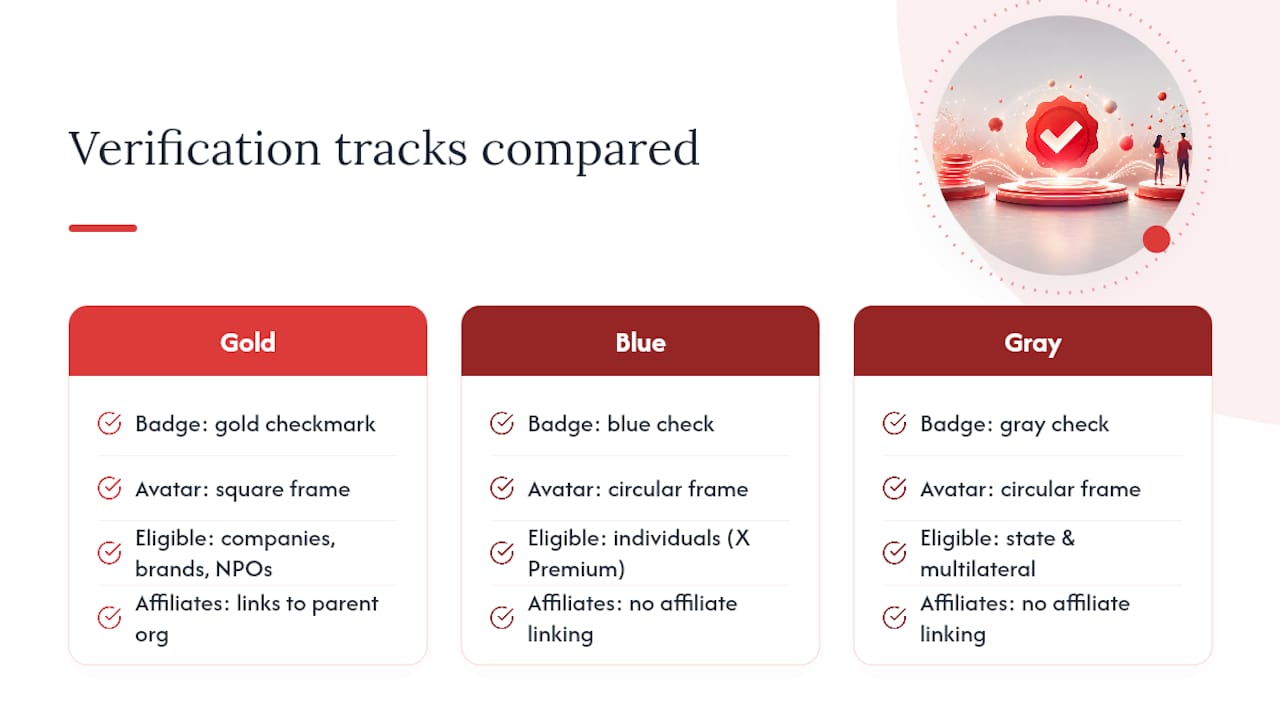
The visual tells are easy to miss if you’re scrolling fast. Verified Organizations accounts display a gold checkmark and a square avatar frame instead of the circular one individual accounts use. Any account affiliated with that organization, an official spokesperson, a regional handle, a support account, shows a small badge linking back to the parent brand. That affiliation display is the actual product here. It tells a customer that the account replying to their complaint is genuinely connected to your company, not an opportunistic copycat.
The functional gaps matter more than the color of the badge. Organizations that verify through the gold tier get access to the affiliate dashboard, and in some rollouts, prioritized support channels when something goes sideways on the platform. Individual blue check holders get algorithmic reply-ranking perks and edit features, but nothing that establishes organizational legitimacy. Some paid verification tiers have also incorporated ID-based checks through a partnership with the identity vendor Au10tix, though availability varies by region and is more limited across the EU, EEA, and UK.
Here’s the part brand managers get wrong most often: none of these badges are an endorsement. A gold check confirms that X validated your business identity and billing details. It says nothing about whether your product claims are accurate, whether your customer service is good, or whether a specific tweet is trustworthy. Since the badge relaunch in late 2022, what verification actually signals to users has shifted, and a badge purchased through a subscription doesn’t carry the same weight it did under the old editorial vetting model. Treat it as an identity confirmation tool, not a trust seal for your marketing claims.
Does Your Brand Actually Need Verified Organizations?
Not every account needs the gold check, and paying for one you don’t need can be an unnecessary cost. The decision comes down to risk exposure and channel volume, not brand size.
Organizational verification earns its cost fast when:
- Your brand has been impersonated before, or operates in a category (finance, crypto, health tech) where fake accounts routinely scam customers.
- You run multiple official handles, regional support, a CEO account, a product account, and need customers to instantly identify which ones are real.
- X is a primary customer support channel and misdirected trust could mean real financial or reputational damage.
- You operate in a regulated industry where visible, verifiable identity reduces compliance and PR risk.
- You’re planning a high-visibility product launch and expect a surge of copycat and scam accounts riding the attention.
Skip it, at least for now, if:
- You’re a single-person brand or solo founder account where an individual blue check covers your needs.
- Your X presence is light, occasional posts, minimal customer interaction, no real impersonation exposure.
- Budget is genuinely tight and the money is better spent on content or profile optimization that improves conversion before adding a trust badge.
Before you commit, run the math the way you would for any other line item. Estimate your current ad spend directed at X, because in past rollouts, advertisers with large ad commitments were sometimes auto-enrolled or exempted from certain verification requirements. Estimate your support ticket volume on the platform. Estimate what one convincing impersonation scam would cost you in refunds, chargebacks, or a viral screenshot. If that number is higher than the subscription fee, the decision makes itself.
Requirements and Pre-Application Checklist
Most rejected applications fail for the same handful of preventable reasons. Assemble every one of these assets before you open the application, not while you’re filling it out.
- A company domain email address. Applications submitted from a personal Gmail or Yahoo account get flagged almost immediately. Use an address on your actual company domain (name@yourbrand.com).
- A website URL that matches your brand name. The domain on your site should visibly correspond to the account name and the email domain you’re applying with. A mismatch here is one of the most common manual-review triggers.
- A high-resolution, square logo. X displays organization avatars in a square frame, not the circle individual accounts use. A logo cropped or stretched from a circular version reads as unfinished.
- A completed bio and banner. An empty banner, a placeholder bio, or a profile that looks freshly created signals low legitimacy to reviewers.
- A confirmed, working phone number attached to the account.
- A legitimate, active posting history. Brand-new accounts with zero tweets and no engagement history face more scrutiny than established ones.
- A billing name that matches your trading name, or documentation ready to explain the difference if it doesn’t.
That last point deserves its own attention because it trips up more applications than any other single factor. If your legal entity is “Nowix Technologies Inc.” but your brand and handle are “Nowix,” billing under the legal name without context can trigger a manual review that stalls for days. When a parent company handles billing for a subsidiary brand, keep supporting documentation, incorporation records, a brand license note, ready to explain the relationship if a reviewer asks.
Pro Tip: Before uploading your logo, shrink it down to 32x32 pixels and look at it on your own screen. If the mark blurs into an unreadable smudge at favicon size, simplify it. X often displays your logo at tiny sizes across notifications and search results, and a detailed logo that reads fine on a billboard can turn into mush on a phone.

Guides that track Verified Organizations applications closely consistently point to the same conclusion: missing domain email, mismatched billing names, and incomplete profiles cause the overwhelming majority of delays, not obscure policy violations.
How to Apply for Verified Organizations on X
The application itself is straightforward once your assets are ready. Here’s the actual sequence, start to finish.
- Log into the account you want to verify (not a personal account) and open Settings. Verified Organizations lives under the account’s settings menu, or you can navigate directly through X’s official Verified Organizations landing page.
- Select “Get Verified” for your organization and choose which account will serve as the primary organizational account. This is typically your main brand handle, the one that will hold the gold check and manage all affiliates.
- Choose your subscription tier. X’s Verified Organizations tiers differ by the number of affiliate slots included and by additional features like checkmark customization. Pick the tier that covers your current affiliate count with a little room to grow, since scaling up later usually costs more per slot than budgeting correctly at the start.
- Upload your square logo and confirm your profile details. This is where a blurry or off-center logo gets flagged, so double-check it renders cleanly before submitting.
- Enter billing information. Use the legal entity name that matches your tax documentation, and make sure the billing address doesn’t contradict the location signals elsewhere on your profile.
- Submit the application. You’ll get an on-platform notification and typically an email confirming receipt.
- Wait for review. Timelines vary, some applications clear in a day or two, others take longer if any detail needs a manual look. If your account already has ID-based verification tied to X Premium, that check can sometimes expedite the organizational review since your identity is already partially confirmed.
- Check for the approval notification. A successful review comes with an email confirming your organization status, and your account switches to the gold check with the square avatar frame almost immediately after.
If you get rejected, X typically sends a reason, or at least enough of a signal to know what to fix. Don’t resubmit the identical application expecting a different outcome. Fix the specific flagged issue first.
One detail worth flagging before you start: because rollout of Verified Organizations has expanded region by region, availability and exact steps can vary slightly depending on where your business is registered. Check your account’s settings directly rather than assuming a US-based walkthrough applies exactly to a UK or APAC entity.
Managing Affiliates: Invites, Acceptance, and Dashboard Upkeep
Getting your primary organization verified is only half the job. The real value of the gold check comes from affiliating every account that speaks for your brand, and that process has its own rules.
Affiliation is a two-way handshake. Your organization sends an invitation from the Verified Organizations dashboard to the specific account you want to link, whether that’s your CEO’s personal handle, a regional support account, or a product-specific handle. The invited account then has to log in and actively accept that invitation. Nothing happens automatically. If the account owner ignores the notification or the invite sits unaddressed, the affiliation badge never appears.
That acceptance step is where launches quietly stall. A few practices keep it from becoming a bottleneck:
- Build a short list of priority accounts before you send a single invite: CEO, head of support, regional handles, key spokespeople.
- Notify each account owner directly (not just through the X notification) that an invite is coming, so it doesn’t get lost or mistaken for spam.
- Set a specific acceptance deadline tied to your launch date, especially if you’re coordinating a public announcement around the new badge.
- Recheck the dashboard a day before any major launch to confirm every intended affiliate actually shows the badge, not just “invited.”
Ongoing maintenance matters just as much as the initial rollout. Removing an affiliate, someone who left the company, an account that got compromised, is done from the same dashboard, and it takes effect immediately. Billing failures are the other risk worth watching closely: if your organization’s subscription payment lapses, affiliate badges can disappear across every linked account at once, not just the primary handle. That’s a bad way to discover a card expired.
Pro Tip: Map your full affiliate list against your org chart once a quarter. People change roles, leave companies, or launch new regional accounts, and a stale affiliate list is either a security gap (ex-employee still badged) or a missed opportunity (new spokesperson account with no badge).

Costs, Billing Behavior, and Realistic Timelines
Verified Organizations runs on a subscription model with a base fee for the organization itself, plus additional per-affiliate costs as you add linked accounts beyond what your tier includes. Reported pricing shapes have shifted since the program’s initial regional rollout, and exact figures can vary by market, so check X’s own billing page for your region’s current rate rather than relying on a number from a year-old guide.
Billing name accuracy is the detail most likely to slow down an otherwise clean application. If your billing entity doesn’t obviously connect to your brand name and website domain, expect a manual review step. A holding company billing for a consumer-facing subsidiary, a marketing agency billing on behalf of a client brand, both scenarios create the exact mismatch that triggers extra scrutiny. Have a one-line explanation and supporting documentation ready before you submit, not after a rejection email arrives.
Ad spend can occasionally intersect with verification status too. Past enforcement periods showed X requiring verified status for certain advertiser accounts, with some large spenders receiving auto-enrollment or exceptions tied to their ad commitments. If your brand runs meaningful ad budget on X, factor that into your timeline expectations, since your account may already be flagged for verification review independent of your own application.
On timing: clean applications with every asset correctly matched tend to clear faster than ones missing a piece. There’s no official published turnaround guarantee, so treat any specific day-count you see elsewhere with skepticism. The fastest lever you control is submitting a complete, consistent application the first time.
Why Applications Get Rejected (and How to Fix Each One)
Rejections almost always trace back to one of a small number of repeat offenders. Here’s what actually causes them and the exact fix for each.
Personal email instead of company domain email. This is the single most common trigger. Switch your account’s associated email to something on your brand’s actual domain before reapplying.
Incomplete or inconsistent profile. An empty bio, no banner, or a bio that doesn’t mention your company name clearly reads as unfinished. Fill in every field with real, specific information that matches your website copy.
Logo quality or shape issues. A blurry, low-resolution, or non-square logo gets flagged on sight. Re-export a clean square version at high resolution before your next attempt, and run the small-size readability check mentioned earlier.
Billing name mismatch with no explanation. If your legal entity name looks nothing like your brand name, add documentation or a brief note about the corporate relationship, and make sure your website’s “About” or legal footer explains the connection too.
Website inconsistency. If your site doesn’t clearly display your company name, or the domain doesn’t match what you’re applying under, fix that first. Reviewers cross-reference your site against your application.
Thin or suspicious account history. A brand-new account with no posts looks like a shell. Build a short runway of genuine activity, real posts, real replies, before applying if your account is brand new.
Once you’ve fixed the specific flagged issue, most guidance suggests waiting a reasonable window before reapplying rather than resubmitting within hours. Document exactly what you changed so if you need to escalate through paid support or an account representative, you can point to specific corrections rather than a vague “we fixed it.” For high-stakes brand accounts managing significant ad spend or audience targeting commitments, a paid support ticket is often worth the cost simply to get a human response instead of another silent rejection.
Nowix’s Field Notes on Logo, Billing, and Rollout Sequencing
After coordinating X launches for tech and AI brands, a few operational details separate a clean approval from a frustrating back-and-forth.
Start with the logo. A mark designed for a landing page hero often falls apart at badge size. If the details blur into noise, you need a simplified symbol variant, sometimes just the letterform or icon portion of your full logo, built specifically for tiny placements like the affiliation badge and favicon.
Billing hygiene comes next, and it’s less glamorous but just as decisive. Match your billing name to your brand identity wherever the two can reasonably align, and if a corporate structure genuinely requires a different legal entity on the invoice, prepare a short explanation and supporting documents in advance. Waiting for a rejection to produce that paperwork costs you a full review cycle you didn’t need to lose.
Sequencing your rollout matters more than most teams expect:
- Verify the core brand handle first. Get your main account approved and stable before touching affiliates.
- Add 3 to 5 essential affiliates next. CEO, head of support, and your most active regional or product handle cover most impersonation risk immediately.
- Coordinate a shared acceptance window. Give every invited affiliate a specific day to accept, so your badge rollout looks intentional rather than staggered over two weeks.
- Scale to secondary accounts after the core group is live. Additional regional handles, campaign-specific accounts, and support satellites can follow once the essentials are confirmed and stable.
Pro Tip: Treat your affiliate rollout like a mini product launch. Send a single internal message the day invitations go out, telling every recipient exactly what notification to expect and by when to act on it. Coordinated acceptance within a 24 to 48 hour window looks cleaner to your audience than badges trickling in over weeks, and it avoids the awkward stretch where your CEO is affiliated but your support account isn’t yet.
Privacy and Security Considerations After Verification
Getting verified changes your exposure profile, not just your badge. A gold check makes your organization a more visible target, and the affiliate structure introduces a new layer to secure.
Every affiliated account effectively vouches for your organization’s identity, which means account security for each one now matters at the organizational level, not just individually. A compromised affiliate account with an active badge can do more reputational damage than an unverified one, because the badge lends it instant credibility. Enforce strong authentication on every affiliated handle, not only your primary organizational account.
Some paid verification paths have incorporated identity checks through a third-party vendor, which means your organization’s admins should be ready for identity documentation requests tied to ID-based verification in some rollouts. Keep an internal record of who has admin access to your Verified Organizations dashboard, and review that list on a regular schedule. Dashboard access is effectively the keys to your entire affiliate network, and it should be treated with the same care as any other admin-level platform credential.
Billing data security is worth a mention too. Your subscription payment method is tied directly to an account that represents your public brand identity, so route billing access through the same access controls you’d apply to any financial system, not a shared marketing team login.
How X’s Verification Policy Changes Affect Brands
Verification policy on X has changed more in the past few years than in the platform’s entire prior history, and brand managers who treat the current rules as permanent are setting themselves up for a surprise.
The badge itself no longer carries the meaning it once did. Since the late 2022 relaunch tied verification to paid subscriptions rather than editorial vetting, the badge shifted from “this account was manually confirmed as notable” to “this account is paying for a tier that includes a checkmark.” That shift is exactly why Verified Organizations exists as a separate, brand-specific track: it rebuilds some of the lost trust signal specifically for companies, distinct from the individual subscription tier.
Regional rollout has also moved unevenly. Features and eligibility that are live in one market may lag in another, and organizational verification’s expansion across regions has happened in stages rather than all at once globally. A brand with entities in multiple countries may find one office can apply today while another waits.
The practical takeaway: build a quarterly habit of checking X’s official documentation for your account rather than relying on a guide written a year ago, including this one. Pricing, tier structures, and regional availability are the three variables most likely to shift with little warning, and a brand manager who assumes last year’s rules still apply is the one who gets blindsided by a billing change or a sudden new requirement.
How Twitter Verification Compares to Other Platform Badges
Every major platform now runs some version of paid or application-based verification for brands, but the mechanics differ enough that a strategy built for one doesn’t transfer cleanly to another.
Meta’s verification for Instagram and Facebook bundles badge status into a subscription (Meta Verified) similar to X Premium, though its business-tier equivalent focuses more on impersonation protection and direct support access than on an affiliate network. LinkedIn verifies companies primarily through workplace confirmation and, for individual profiles, through ID or employer checks, with no equivalent to X’s affiliate badge system linking multiple official handles under one organization. TikTok’s brand verification remains largely application-based and selective, without a self-serve paid tier comparable to Verified Organizations.
The feature that sets X’s Verified Organizations apart is the affiliate structure itself. No other major platform lets a single verified organization formally link and badge multiple distinct accounts, spokespeople, regional handles, support channels, under one visibly connected identity. For a brand running a CEO account, a support handle, and two regional presences, that’s a meaningfully different value proposition than a single badge on a single profile. If your brand identity spans several official accounts, X’s model solves a coordination problem the other platforms don’t directly address.
What Verification Actually Buys a Tech Brand in a Launch Window
Verification matters most in the exact moments when a brand is most exposed: the hours after a product launch, a funding announcement, or any spike in public attention. That’s when impersonation accounts move fastest, and a visible gold check with a properly maintained affiliate network gives your audience an immediate way to tell the real account from a copycat riding your momentum.
The badge alone doesn’t build trust on its own, though. It works best paired with a coordinated response plan, someone actively monitoring mentions, a clear escalation path if an impersonator gains traction, and a community management rhythm that reinforces which accounts are official. Verification without that operational backbone is a checkbox. Verification combined with active engagement management during a high-visibility window is a real defense.
The honest cost-benefit conversation looks different depending on company size. For an enterprise tech brand running paid campaigns and multiple regional accounts, the subscription and affiliate fees are a rounding error against the reputational risk of a viral impersonation scam. For a midmarket AI startup with a lean team and modest ad spend, the calculation is closer, and it often comes down to how much customer support and community interaction actually happens on X versus other channels. Verification is a tool for a specific risk profile, not a default line item every brand needs on day one.
Get Your Verification and Launch Handled by Nowix
Assembling assets, matching billing names, and coordinating affiliate acceptance across a launch team takes real coordination time, time most brand managers would rather spend on the campaign itself. Nowix handles the operational load of getting your organization verified and turns that badge into actual visibility the moment it goes live.
Our team preps your logo variants and profile assets, submits the Verified Organizations application, and coordinates affiliate invitations across your CEO, support, and regional accounts so acceptance happens in a tight, intentional window instead of trickling out over weeks. Once your gold check is live, we connect it directly into a launch push through organic post amplification, putting your newly verified account in front of the timeline at the exact moment it matters most. For brands that want the badge and the ongoing account strategy handled together, our X management service covers daily content, replies, and community engagement so the verification investment keeps paying off long after launch week.
If you’re planning a product announcement and want verification, affiliate setup, and a coordinated go viral launch working together instead of as separate scrambles, reach out to Nowix for a free account audit and we’ll map the fastest path to a verified, launch-ready presence.
Where to Check Current Verification Rules and Pricing
Policy and pricing on X change often enough that any single article, including this one, should be treated as a snapshot rather than a permanent reference. A few sources are worth bookmarking directly.
X’s own help documentation remains the definitive source for current eligibility rules, subscription tiers, and regional availability, since platform policy can shift with little public notice. Check it directly before finalizing your application rather than relying on a secondhand summary.
For ongoing reporting on how verification policy actually plays out in practice, TechCrunch’s coverage of ID-based verification explains the identity vendor partnership and regional limitations. The Verge’s analysis of the 2022 badge relaunch remains the clearest explanation of how the badge’s meaning shifted. Social Media Today’s reporting on regional expansion tracks where and when Verified Organizations became available. PostInstantly’s setup guide offers one of the more detailed walkthroughs of the actual application flow. If your marketing team needs broader digital strategy support alongside verification, HarbourSide Digital’s service offerings cover complementary work worth exploring.
Sources
- X launches account verification based on government ID — TechCrunch
- Set up a Verified Organization on X — PostInstantly
- Twitter expands ‘Verification for Organizations’ to more regions — Social Media Today
- Twitter relaunches verification and changes what the check means — The Verge
Recommended
- Twitter Brand Safety for Tech and AI Marketers
- X Marketing Agency for Tech Brands: Engineering Algorithmic Distribution in 2026
- Twitter Trending Strategy 2026: The Engineered Playbook for Tech Brands
- Twitter Growth Playbook for Tech Brands 2026
Frequently asked questions
Does a verification badge prove a brand is trustworthy?
A badge and a marketing claim are different signals. Evaluate the account identity, linked website, product evidence and the current platform requirements separately.
Should verification be the first X marketing priority?
First make the profile, product explanation, content and intended next step clear. Evaluate paid account features against your actual publishing and business needs.