
X (Twitter) is your fastest-moving B2B support channel. Use it. Run a public-to-private workflow, set a 60-minute first-response SLA during business hours, and decide within the next week whether to staff in-house or pilot an agency. Three moves to make right now:
- Set your baseline SLA. Acknowledge publicly within 60 minutes during business hours. Research from The Social Habit shows many customers expect a response within a short time window during business hours.
- Lock in your routing rule. Public reply for acknowledgment, DM for anything requiring account details or troubleshooting steps.
- Choose your model. In-house rota, dedicated contractor, or a managed agency like Nowix for full coverage with amplification built in.
Zendesk research puts X at 206 million daily active users, with two out of three preferring it for customer service over other social platforms. For tech and AI brands, that reach is not optional.
Table of Contents
- Why X works for B2B customer support
- What response-time SLAs should you set on X?
- Public replies vs. DMs: when to use each
- How does a support workflow run from mention to resolution?
- Which tools make X support scale?
- Roles, shift models, and playbook snippets for your team
- What metrics should you track for X support?
- How do you evaluate and brief an agency for X support?
- How do you onboard a team to X support?
- How do you manage a crisis or negative publicity on X?
- What data privacy rules apply to X interactions?
- Key Takeaways
- The case for treating X support as a growth function
- Nowix runs your X support and amplification together
- Useful sources and further reading
Why X works for B2B customer support
Most B2B teams underinvest in X support because they assume the audience skews consumer. The data says otherwise. According to Business.com, one-third of U.S. X users hold college degrees and earn over $75,000 annually. That is your buyer, your champion, and your decision-maker, all in one feed.
The channel advantages for tech and AI brands are concrete:
- Real-time visibility. A public reply to a support issue is indexed and discoverable. Future customers searching for your product’s reliability find your responsiveness first.
- Reputation compounding. Every empathetic, fast reply builds a public record of trust.
- Cost efficiency. Resolving an issue publicly once eliminates dozens of repeat tickets on the same topic.
- Proactive outreach. You can monitor product mentions, competitor frustrations, and feature requests without waiting for a ticket.
Pro Tip: Convert your strongest public support threads into pinned help threads or FAQ posts. They become evergreen documentation that earns reach long after the original exchange.
What response-time SLAs should you set on X?
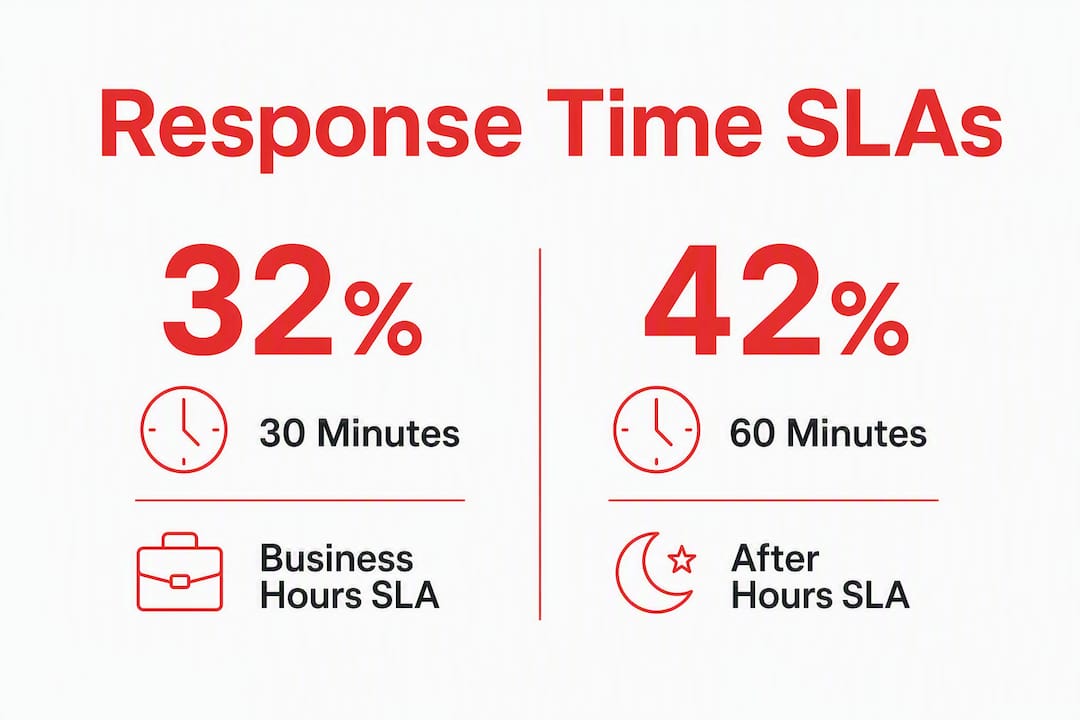
The Social Habit research is direct: 32% of customers expect a reply within 30 minutes, and 42% within 60 minutes. For B2B tech brands, the stakes are higher because a public unresolved complaint during a product launch can derail momentum fast.
| Time window | Acknowledgment target | Resolution target | Measurement |
|---|---|---|---|
| Business hours (9 AM–6 PM) | 30 minutes | 4 hours | Median first-response time |
| After hours (6 PM–midnight) | 90 minutes | Next business day | P95 first-response time |
| Critical incident (outage/data) | 15 minutes | Ongoing updates every 30 min | Time-to-first-public-update |
| Weekends | 60 minutes | 60 minutes | Volume-weighted average |
57% of B2B customers expect the same response speed on nights and weekends as during business hours. That single stat should drive your staffing decision.
Decision checklist for 24/7 coverage:
- Product is mission-critical or SaaS with uptime dependencies
- You have international customers across time zones
- Launch campaigns generate overnight volume spikes
- Your competitors already staff after hours
Pro Tip: Publish your support hours in your X bio and pin a post with your response-time commitment. It sets expectations before a frustrated customer sends their first tweet.
Public replies vs. DMs: when to use each
Default to public acknowledgment, then move fast to DMs. Zendesk’s guidance is clear: public replies demonstrate urgency and empathy; DMs handle anything requiring private data or multi-step troubleshooting.
Reply publicly when:
- Acknowledging a complaint or question
- Sharing status updates during outages
- Answering general product questions that benefit other users
- Posting workarounds for known issues
Move to DMs when:
- Any account-specific detail is needed
- Billing, subscription, or legal matters arise
- Troubleshooting requires credentials or logs
- The conversation involves compliance-sensitive data
Sample handoff template: “Thanks for flagging this, [handle]. We’re on it. Sending you a DM now so we can look into your account details securely.”
Pro Tip: Use X’s native deep-link feature to send a pre-filled DM link in your public reply. It removes friction and keeps the handoff seamless without asking the customer to find your DM button.
How does a support workflow run from mention to resolution?
The flow is: monitor → triage → ticket → resolve → public close. Every mention that needs action becomes a ticket. Every ticket gets a tag. Every tag feeds a report.
Step by step:
- Monitor. Social listening tools catch direct mentions, misspellings, and indirect product references. Manual searches miss too much at volume.
- Triage. A triage owner classifies severity (P1 outage, P2 bug, P3 question, P4 feedback) and routes to the right agent or team.
- Ticket. The mention is logged in your ticketing system with the original tweet URL, severity tag, product-area tag, and campaign tag if applicable.
- Resolve. The assigned agent replies publicly or via DM, following the routing rule above.
- Public close. When resolved, post a brief public follow-up confirming the fix. It closes the loop visibly.
Escalation timeline: acknowledge within SLA, escalate to a senior agent at 2× SLA, notify the product team at 4× SLA for systemic issues.
Pro Tip: Tag every ticket with a product-area label. Over 90 days, those tags surface your most common pain points and feed directly into your product roadmap without a separate research sprint.

Which tools make X support scale?
Build your stack in four layers:
- Listening layer. Tools that monitor mentions, hashtags, and keyword variants including misspellings. Zendesk notes that proactive listening catches issues before they escalate.
- Ticketing layer. A system that ingests DMs and mentions as tickets, assigns them, and tracks SLA compliance. Zendesk, Freshdesk, and Sprinklr all support X natively.
- Agent workspace. A unified inbox where agents reply to X, email, and chat without switching tabs.
- Analytics layer. Dashboards tracking response time, resolution rate, volume by tag, and CSAT.
Automation rules that are safe: auto-acknowledge after-hours mentions with your response-time window, auto-tag by keyword, and auto-escalate tickets that breach SLA thresholds.
Automation to avoid: auto-closing tickets without human confirmation, bot replies on sensitive accounts or legal complaints, and any automation that sends PII through unsecured channels.
Pro Tip: Create a dedicated support handle (e.g., @YourBrandHelp) to separate support volume from your main marketing feed. Industry guidance consistently shows this reduces noise and speeds triage.
Roles, shift models, and playbook snippets for your team
A practitioner-run support team for a tech or AI brand needs four roles: a channel lead (owns SLA and reporting), triage agents (classify and route), an escalation engineer (handles P1/P2 technical issues), and a manager (weekly review and calibration).
| Model | Coverage | Speed | Cost profile |
|---|---|---|---|
| Dedicated support account team | 24/7 possible | Fastest | Highest fixed cost |
| Rotating in-house agents | Business hours + on-call | Moderate | Medium, variable |
| Agency-managed (e.g., Nowix) | Configurable, up to 24/7 | Fast with playbook | Retainer, predictable |
Three templated reply snippets:
- Acknowledgment: “Hey [handle], we see this and we’re looking into it now. Expect an update within [X] minutes.”
- DM handoff: “Sending you a DM to sort this out securely. Watch for our message.”
- Escalation notice: “This one’s with our engineering team. We’ll update you publicly as soon as we have a fix.”
Onboarding checklist for any new agent: access to the knowledge base, escalation contact list, runbook for top 10 issue types, and a 2-week calibration period with reply review before going solo.
What metrics should you track for X support?
Track these KPIs every week:
- Median first-response time and P95 (catches outliers)
- Resolution rate (tickets closed vs. opened in the same period)
- CSAT collected via DM follow-up or post-resolution survey
- Volume by tag (product area, severity, campaign)
- Reopened rate (a signal of resolution quality)
- Public sentiment trend (net positive/negative mentions week over week)
Reporting cadence: daily triage summary for the support lead, weekly SLA trend for the growth lead, monthly executive snapshot with CSAT and volume trends. Pair these with engagement benchmarks to show how support visibility contributes to organic reach.
How do you evaluate and brief an agency for X support?
Start with a 30–60 day pilot. Objectives: validate SLA compliance, test escalation paths, and confirm tool integration before signing a retainer.
RFP must-haves:
- Written SLA commitments with measurement methodology
- Sample playbook and tone guide
- Tool stack and CRM integration plan
- Sample reporting dashboard
- Security and data handling documentation
- Reference case studies from tech or SaaS brands
Briefing template fields to send any agency: business objectives, peak hours and launch calendar, product risk areas, escalation contacts and access levels, and approved reply templates.
Red flags: no audit logs, no integration plan, unclear escalation ownership, and no reference from a comparable brand.
How do you onboard a team to X support?
Onboarding for X support is different from general customer service training because the channel is public, permanent, and fast. Every reply is indexed. A tone error at 2 AM is visible to your entire audience by morning.
For in-house teams, run a two-week shadow period before live replies. Cover platform mechanics (threading, DM deep-links, tagging), brand voice calibration with scored reply exercises, and escalation drills using simulated P1 scenarios.
For outsourced teams, require the agency to deliver a written runbook before go-live. The runbook must include: approved reply templates, escalation contact tree, access credentials protocol, and a list of topics that require legal review before posting. Schedule a weekly calibration call for the first 60 days.
Both models need a shared knowledge base that updates in real time. When engineering pushes a fix, the support team needs to know within minutes, not hours.
How do you manage a crisis or negative publicity on X?
Speed and transparency are the only tools that work. When a negative story or outage hits X, the first public reply from your brand sets the tone for everything that follows.
Crisis protocol:
- Post a public acknowledgment within 15 minutes of identifying the issue, even if you have no resolution yet.
- Pin the acknowledgment post so it stays at the top of your profile.
- Update publicly every 30 minutes until resolved. Silence reads as indifference.
- Use @XSupport and official status pages to cross-reference platform-level issues and reduce duplicate inbound tickets.
- After resolution, post a brief post-mortem summary publicly. It builds more trust than the crisis cost you.
Never delete a complaint post unless it violates platform rules. Deletion escalates anger and signals you have something to hide. Respond, resolve, and document.
What data privacy rules apply to X interactions?
X interactions carry compliance obligations that most teams underestimate. The core rule: never request or accept personally identifiable information (PII) in a public reply. That means no email addresses, account numbers, or order IDs in the public thread.
Key compliance considerations for U.S.-based tech brands:
- CCPA. California Consumer Privacy Act applies if you collect or process data from California residents. DM conversations that involve account data may trigger data subject rights obligations.
- GDPR for EU customers. If your product serves EU users, DM exchanges involving personal data fall under GDPR processing rules, even when the interaction starts on a U.S. platform.
- Audit trails. Every DM that becomes a ticket must be logged with timestamp, agent ID, and resolution action. This is non-negotiable for regulated industries.
- Data retention. Define how long X interaction data is stored in your ticketing system and who has access. Align with your broader data retention policy.
This section covers general compliance considerations, not legal advice. Confirm your specific obligations with qualified legal counsel.
Key Takeaways
X is the highest-leverage B2B support channel for tech and AI brands when you pair a public-to-private workflow with clear SLAs, the right toolstack, and a practitioner-run team or agency.
| Point | Details |
|---|---|
| Set a 60-minute SLA | 42% of customers expect a response within 60 minutes; publish your hours in your X bio. |
| Route public to private | Acknowledge publicly, move account or PII details to DMs, and log every DM as a ticket. |
| Staff for weekends | 57% of B2B customers expect equal response speed on nights and weekends. |
| Track five core KPIs | Median response time, resolution rate, CSAT, volume by tag, and reopened rate. |
| Nowix for managed coverage | Nowix runs practitioner-led X account management with SLAs, workflows, and amplification for tech and AI brands. |
The case for treating X support as a growth function
The conventional wisdom treats support and marketing as separate budgets with separate teams. On X, that split is a liability. Every public reply your support team sends is a piece of content. It is indexed, shareable, and visible to every potential buyer who searches your brand name before signing a contract.
The brands that win on X in 2026 are the ones that close the loop between support and growth. A resolved complaint, handled publicly with speed and empathy, does more for pipeline than most sponsored posts. The support thread becomes a trust signal. The trust signal becomes a conversion asset.
One non-obvious move: route your support tags directly into your product backlog. When the same feature request appears in 40 tickets over 30 days, that is not a support problem. It is a roadmap signal. Teams that build this feedback loop ship faster and churn less.
Nowix runs your X support and amplification together
Tech and AI brands that want full X coverage without building an internal team get both with Nowix: practitioner-led X account management that covers daily replies, community engagement, and support operations, paired with campaign amplification when you launch.
What Nowix delivers:
- SLA-backed monitoring and triage, configured to your business hours and product risk areas
- Public-to-private workflows with DM-to-ticket integration
- Crisis escalation protocols and post-mortem documentation
- Post amplification with vetted micro-KOLs to turn strong support moments into organic reach
- Surge support for product launches, coordinated with your campaign calendar
Engagement models: 30–60 day pilot to validate SLA and workflow fit, monthly retainer for ongoing management, or surge support for high-volume launch windows. Ready to see what managed X support looks like for your brand? Talk to the Nowix team and get a pilot scoped this week.
Useful sources and further reading
- Zendesk: 10 tips for great customer service on Twitter — Practitioner guidance on public-to-private workflows, DM integration, and social listening.
- Business.com: Why Twitter is an excellent customer support channel — Audience demographics and B2B fit data for X.
- Nowix: X account management service — Managed X support and community engagement for tech and AI brands.
- Nowix: Twitter growth playbook for tech brands — High-level growth framework that pairs with support best practices.
Recommended
- Twitter Growth Playbook for Tech Brands 2026
- Twitter Trending Strategy 2026: The Engineered Playbook for Tech Brands
- How to Increase Twitter Engagement in 2026
- X Profile Management for Startups: The 2026 Growth Playbook
Frequently asked questions
Does this guide mean Nowix offers X customer support or community management?
No. This is informational content. Nowix’s services cover X content, publishing and marketing campaigns; reply handling, moderation, customer support staffing and DM management are outside the offer.
How should a brand define responsibilities around sensitive conversations?
Agree an internal approval owner, escalation route and verified facts before publication. Keep marketing content responsibilities separate from customer support and moderation responsibilities.