
Start with three searches right now: your @handle, your exact brand or product name (including common misspellings), and your domain. This three-query foundation, recommended by community tracking practitioners, covers tagged mentions, untagged references, and shared links simultaneously. It takes under ten minutes to set up and immediately closes the biggest blind spot most teams have: the conversations happening about you that never trigger a notification.
Run these three searches first:
@YourHandle— catches direct mentions and replies"YourBrandName" OR "YourBrandNaem"— catches untagged references and common misspellingsurl:yourdomain.com— catches posts sharing your content without tagging you
Quick-action checklist:
- Next 10 minutes: Run all three searches in X Advanced Search. Note which returns the most noise.
- Next 60 minutes: Save each as a named search in X. Set up one TweetDeck/X Pro column per query. Assign a team owner to each column.
- Next 240 minutes: Sample 20 results from each query. Label each result “useful” or “noise.” If fewer than five results per 20 are useful, the query is too broad and needs a refinement pass.
Each query maps to a different response urgency. @handle mentions are usually the highest priority because they are public and visible to your followers. Untagged brand mentions often surface product complaints or competitor comparisons that no one on your team has seen. Domain shares frequently come from journalists, analysts, or power users who linked your content without tagging you — a high-value signal for PR and content teams.
Pro Tip: Add -filter:retweets to every query from the start. Retweets inflate result counts without adding new signal, and removing them immediately sharpens what you see.
Key Takeaways
A strong Twitter mention strategy starts with three searches, assigns a named owner to every mention category, and measures six KPIs to convert mention signals into business outcomes.
| Point | Details |
|---|---|
| Run three searches immediately | @handle, brand name (with misspellings), and domain — these cover tagged, untagged, and link-share mentions. |
| Native notifications miss most mentions | Brand name and hashtag mentions produce no X alerts; keyword monitoring is required for full coverage. |
| Triage by mention type | Assign priority, owner, and SLA to each category — safety and viral complaints require under-1-hour response. |
| Track six KPIs | Mention volume, sentiment ratio, estimated reach, share of voice, response rate, and mention-to-conversion. |
| Nowix accelerates mention growth | Creator surges, post amplification, and managed X accounts turn mention strategy into a repeatable, measurable system. |
Table of Contents
- What counts as a Twitter/X mention, and why does it matter?
- How do you find mentions using native tools and search operators?
- How do you track mentions at scale without missing what matters?
- How should you triage and respond to mentions?
- What KPIs should you track to measure mention impact?
- Proven tactics to generate more mentions on X
- The Nowix playbook: five experiments that reliably lift mentions
- How to integrate Twitter mention data with your marketing and CRM stack
- Why mentions are the most underrated signal for tech and AI brands
- What Nowix delivers for brands that want more mentions on X
- Sources
What counts as a Twitter/X mention, and why does it matter?
Not every reference to your brand triggers a notification. Understanding the full taxonomy is what separates a reactive monitoring setup from a proactive one.
The seven mention types you need to track:
- Direct @username mention: A post that includes your handle anywhere in the body text. X fires a native notification for these.
- Reply: A post sent directly in response to one of your posts. Also triggers a notification, but only visible in your Notifications tab and the original thread.
- Quote tweet (QRT): A repost with added commentary. Triggers a notification, but the commentary can be critical or misleading — read before you respond.
- Untagged brand/product name mention: Someone writes your brand name without the @ symbol. Zero native notification. Requires keyword monitoring.
- Branded hashtag: Posts using a campaign hashtag you own or one that has organically attached to your brand. No notification unless you are tagged alongside it.
- Domain share: A post linking to your website or a specific page, with or without tagging you. Caught only by
url:operator searches. - Image-only mentions: Screenshots or graphics where your brand name appears in text within the image. These are invisible to all text-based search tools.
The critical gap: X’s native notification system only fires for direct @username mentions and replies. Brand name mentions, hashtag references, and domain shares produce zero alerts — meaning the majority of conversations about your brand are happening in silence unless you build keyword monitoring on top of native notifications.
The practical implication is significant. A competitor comparison post, a product complaint, or a journalist’s thread can accumulate hundreds of replies before your team even knows it exists. Sprout Social’s guidance on Twitter mentions confirms that native notifications alone leave major coverage gaps, which is why keyword monitoring is a non-negotiable layer.
Edge cases worth knowing:
- Misspellings: Common for brands with unusual spelling. Always include one or two variant spellings in your keyword queries.
- Substring collisions: Short brand names that match common words (e.g., a brand called “Arc” will surface posts about arcs, architecture, and Arc browsers). Use phrase-match operators and exclusions.
- Private accounts: Their posts are invisible to search. No workaround exists.
- Image-only mentions: Require manual discovery or AI-powered visual listening tools. Flag these as a known blind spot in your monitoring SOP.
How do you find mentions using native tools and search operators?
Native notifications are a starting point, not a system. Here is the full playbook for finding mentions across X’s built-in tools.
Start here: Advanced Search is more powerful than most teams realize. Access it at twitter.com/search-advanced or by clicking the filter icon after any search. It supports Boolean operators, date ranges, language filters, and account-level targeting.
Step-by-step search setup
- Run your @handle search: Type
@YourHandle -from:YourHandleto see all mentions excluding your own posts. - Run your brand name search: Use
"ExactBrandName" -from:YourHandlewith phrase-match quotes to catch untagged references. - Add misspelling variants: Combine with OR:
"BrandName" OR "BrandNaem" OR "Brandname". - Add domain monitoring: Use
url:yourdomain.comto catch link shares. - Filter by language: Add
lang:ento limit results to English-language posts when global noise is a problem. - Exclude retweets: Append
-filter:retweetsto every query. This removes amplified content and surfaces only original posts. - Save each search: Click the three-dot menu after running a search and select “Save search.” X allows up to 25 saved searches per account.
Copyable operator examples:
@YourHandle -from:YourHandle -filter:retweets"YourBrand" OR "YourBrnd" -filter:retweets lang:enurl:yourdomain.com -filter:retweets#YourBrandedHashtag -filter:retweets min_faves:5
Setting up X Pro/TweetDeck columns
Create one column per saved query. Assign each column a named owner on your team. Set the column refresh rate to real-time during campaigns and to manual review during low-volume periods. This setup turns your monitoring from a daily task into a live feed.
Review cadence recommendations:
- Real-time: During product launches, campaigns, or any event where mention surges are expected.
- Daily: Standard operating cadence for most brand teams. Morning and end-of-day sweeps cover the bulk of actionable mentions.
- Weekly: Sufficient for low-volume brands or for tracking branded hashtags and domain shares that rarely spike.
Pro Tip: When a query returns too much noise, add one exclusion at a time rather than multiple at once. Academic research on social listening shows that over-filtering in a single pass routinely removes useful signal alongside the noise. One exclusion, sample, repeat.
How do you track mentions at scale without missing what matters?
Pick the smallest workflow that reliably catches your business-critical mentions. That principle sounds obvious, but most teams either under-invest (manual checks only) or over-invest (enterprise tools for 50 mentions a day) and end up with a system that either misses things or nobody actually uses.
The workflow continuum
The right level depends on four variables: mention volume, required response speed, cross-platform coverage needs, and reporting requirements.
Decision checklist:
- Volume under 50 mentions/day: Saved searches and X Pro columns are sufficient. One person, 30 minutes daily.
- Volume 50–500 mentions/day: Add a dedicated social listening tool for aggregation, sentiment tagging, and routing. Assign a community manager as the primary owner.
- Volume over 500 mentions/day or active campaign: Agency-managed workflow or enterprise platform with automated triage and escalation routing.
- Cross-platform coverage needed: Native X tools cover X only. Any brand with meaningful Reddit, LinkedIn, or news coverage needs a tool that aggregates across sources.
- Reporting to leadership: Manual workflows produce no exportable data. Even a lightweight tool with CSV export changes what you can report.
Workflow templates by scale
Small team (1–3 people):
- Owner: Social media manager
- Cadence: Daily morning sweep, real-time during campaigns
- Routing: Slack channel with one thread per mention category (support, PR, product)
- Query log: Spreadsheet with columns for post URL, author handle, timestamp, category, and action taken
Mid-size team (3–10 people):
- Owner: Community manager (primary), brand manager (escalation)
- Cadence: Real-time column monitoring, weekly sentiment summary
- Routing: Ticketing system (e.g., Zendesk or Linear) for support mentions; Slack for PR and product signals
- Query log: Tool-native export plus weekly CSV to analytics
Agency-managed:
- Owner: Agency campaign lead + in-house brand manager for approvals
- Cadence: 24/7 monitoring with defined escalation windows
- Routing: Agency-to-client Slack channel with daily digest and real-time alerts for high-reach or crisis mentions
- Query log: Agency-provided dashboard with mention volume, sentiment trend, and response rate
Pro Tip: Route to an agency when you need 24/7 coverage, campaign-scale amplification, or crisis response capacity that your internal team cannot staff. Keep monitoring in-house when volume is predictable and your team has the bandwidth to act on what they find.
How should you triage and respond to mentions?
The single most important rule: prioritize safety and high-impact public replies first, then move complex issues to DM. A public reply that says “Thanks for flagging this — we’re sending you a DM now” protects your brand’s visible response record while keeping sensitive details private.
Triage matrix
Response timing SLA
- Immediate (under 1 hour): Safety, legal, or viral reputation risk.
- Same business day: Buyer intent, product feedback, support requests.
- 48 hours: Competitor comparisons, general brand sentiment.
Response templates
Public acknowledgment (buys time, moves to DM): Buyer intent reply: Product feedback acknowledgment: When escalating to comms, legal, or product, include: post URL, author handle, visible follower count or estimated reach, screenshot, and the category label from your triage matrix.
Pro Tip: The one-line public acknowledgment is your most valuable tool. It closes the visible response gap immediately, signals to other users that you are responsive, and gives you time to handle the issue properly in private.
Buffer’s research on X engagement confirms that early, thoughtful replies drive more visibility than standalone posts — so every public acknowledgment you post also extends the reach of the original mention thread.
What KPIs should you track to measure mention impact?
Track six metrics: mention volume, sentiment, reach (estimated impressions), share of voice, response rate, and conversion attributed to mention-driven traffic. Together, they tell you whether your mention activity is growing, whether the tone is shifting, and whether mentions are actually driving business outcomes.
Metric definitions and formulas
| Metric | Formula / Definition | Use in reporting |
|---|---|---|
| Mention volume | Total mentions in period (tagged + untagged) | Baseline trend; spike detection |
| Sentiment ratio | Positive mentions / total mentions | Brand health; crisis early warning |
| Estimated reach | Sum of author follower counts for all mentions | Visibility proxy; PR value estimate |
| Share of voice | Your mention volume / (yours + category total) | Competitive positioning |
| Response rate | Replies sent to actionable mentions / total actionable mentions | Team responsiveness; SLA compliance |
| Mention-to-conversion | UTM-tagged sessions from mention-driven clicks / total mention clicks | Revenue attribution |
Why untagged mentions matter: During a high-volume product moment, a single brand can accumulate thousands of untagged mentions in a single day. Brand24’s research on Twitter mention tracking cites an example where an app generated approximately 2,000 mentions in one day with an estimated reach of 88 million — the vast majority of which would have been invisible to a team relying only on native notifications.
Piping mention data into your CRM or analytics stack
Every mention you log should carry these fields before it enters any downstream system:
- Post URL
- Author handle and follower count
- Timestamp
- Sentiment label (positive / neutral / negative)
- Category (support / PR / product / buyer intent / noise)
- Estimated reach
- Routing owner
- Action taken and date
With these fields consistent, you can segment mention data by campaign, by product, or by sentiment trend in any BI tool. UTM parameters on any links you share in replies close the loop between mention engagement and site traffic in Google Analytics or your CRM.
Proven tactics to generate more mentions on X
Combine creator seeding, conversation-first posting, and clear CTAs. That combination generates both volume and quality — mentions from people who have something real to say, not just amplified noise.
Organic tactics
- Conversation hooks: End posts with a direct question. “What’s your take?” or “Which approach do you use?” invites replies that often include your handle in the thread.
- Ask-to-mention CTAs: “Tag a founder who needs to see this” or “Who on your team handles this?” are low-friction CTAs that generate mentions without feeling forced.
- Thread + self-reply technique: Post a thread and add a self-reply with a summary or a strong opinion. Self-replies and early engagement extend a post’s visibility window and draw more replies into the thread.
- Branded hashtag seeding: Introduce a hashtag in your own posts consistently before asking others to use it. Seed it with 10–15 posts before any campaign push.
- UGC repost + credit: When someone mentions you positively, QRT with credit. It signals to others that mentions get visibility, which encourages more.
Amplification tactics
- Controlled QRTs from micro-KOLs: Brief vetted micro-influencers to QRT your launch post with their genuine reaction. This seeds the timeline with varied voices rather than identical reposts.
- Timed creator surges: Coordinate a group of creators to post within a defined window (60–90 minutes) during a launch. The concentrated activity signals momentum to the algorithm and to organic viewers. For guidance on finding the right creators for this kind of surge, vet by niche alignment and recent engagement rate, not follower count alone.
- Early comment amplification: Have team members or briefed micro-KOLs reply to your launch post within the first 15 minutes. Early engagement boosts post visibility, which draws more organic replies and mentions.
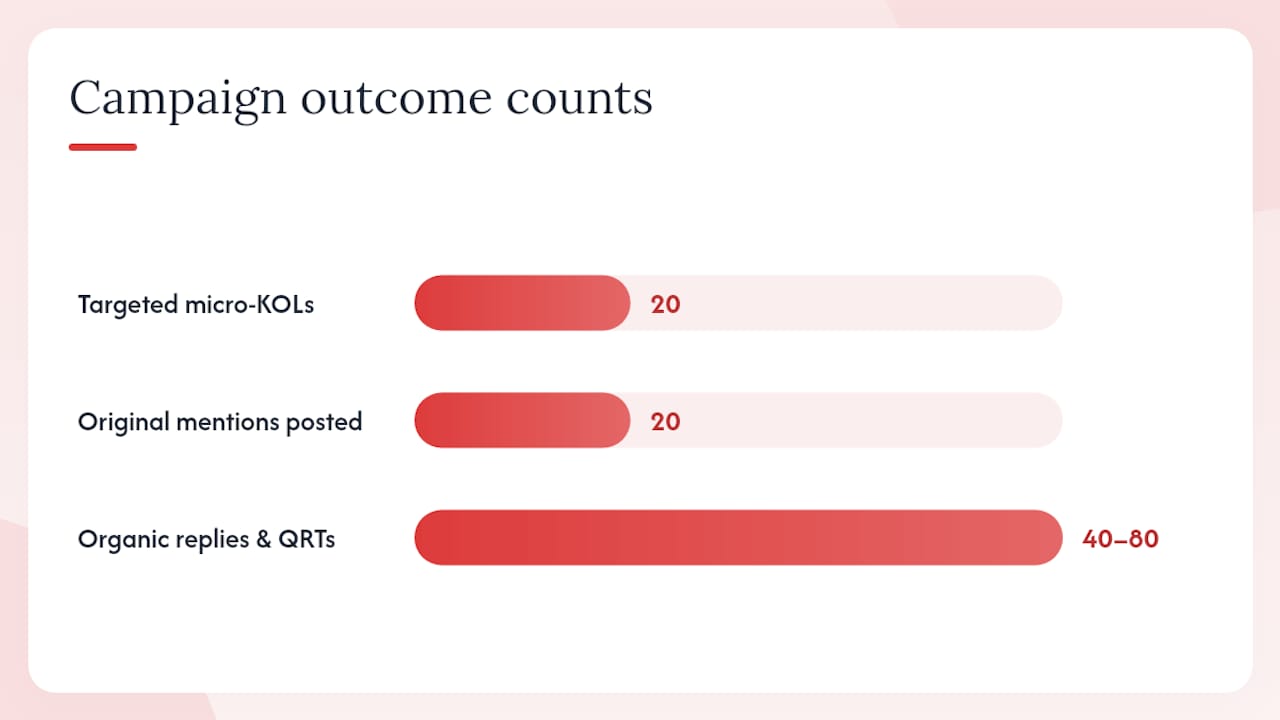
Campaign example: A 48-hour creator surge targeting 20 micro-KOLs, each posting one original mention within a 90-minute window, typically seeds 40–80 organic replies and QRTs from their audiences within 24 hours — generating a second wave of untagged mentions that keyword monitoring catches.
Pro Tip: Design CTAs that name a specific person or role (“Tag your growth lead”) rather than a generic audience (“Tag a friend”). Specificity increases follow-through and tends to surface higher-quality mentions from relevant accounts.
For more on thread ideas that drive engagement, structured threads with a strong opening claim consistently outperform single-post announcements for mention generation.
The Nowix playbook: five experiments that reliably lift mentions
These five experiments are the core of how Nowix approaches mention growth for tech and AI brands. Each maps to a specific campaign moment and comes with a benchmark metric to watch.
The underlying principle: Mentions for tech and AI brands are not a vanity metric. They are a discovery signal. When your brand name appears in enough conversations on X, it starts appearing in the training data and retrieval outputs of large language models — which means your mention volume today influences how AI tools describe your category tomorrow.
The five experiments
1. Launch surge (Day 0)
- Execution: Brief 15–30 micro-KOLs with a creator brief 48 hours before launch. Coordinate posts within a 60-minute window on launch day.
- Benchmark: Target a 3x–5x spike in mention volume versus your 7-day baseline within the first 4 hours.
- Owner: Campaign lead (Nowix) + brand manager (approvals)
2. Product update amplification (Ongoing)
- Execution: For each meaningful product update, seed 5–10 QRTs from vetted accounts with genuine reactions. Stagger posts over 2–3 hours to sustain timeline presence.
- Benchmark: Watch for a 20%+ lift in untagged brand mentions in the 48 hours following the update.
- Owner: Amplification ops
3. Content calendar push (Weekly)
- Execution: Publish one high-opinion thread per week with a direct ask-to-mention CTA. Self-reply with a supporting data point or counterargument within 30 minutes of posting.
- Benchmark: Aim for a reply rate above 5% of impressions on the anchor post.
- Owner: Community responder + content lead
4. Influencer seed (Pre-launch)
- Execution: Share an early-access brief with 3–5 niche influencers 7–10 days before launch. Ask for organic posts, not scripted ones. Monitor for untagged mentions from their audiences.
- Benchmark: Each seeded influencer should generate 5–15 organic mentions from their audience within 72 hours of their post.
- Owner: Campaign lead
5. Crisis response (Reactive)
- Execution: When a negative mention surges, deploy a public acknowledgment within 60 minutes. Assign a dedicated community responder for 24-hour coverage. Brief a small group of brand advocates to add balanced perspective to the thread.
- Benchmark: Sentiment ratio should stabilize (negative mentions declining as a share of total) within 6–12 hours of response deployment.
- Owner: Brand manager (escalation) + Nowix community responder
Oreo’s real-time Super Bowl response remains the canonical proof that speed and creative relevance in a mention response can generate earned visibility that no paid campaign could replicate. The principle scales down: a fast, well-crafted reply to a viral complaint or a trending moment works for a 10,000-follower tech brand the same way it worked for Oreo.
Practical caveats: Platform rhythm matters. Posting during low-traffic windows (late night, early morning US Eastern) reduces organic reach regardless of creator volume. Creative variation is required across creator posts — identical language signals coordination and reduces credibility. Always comply with FTC disclosure requirements for paid or gifted creator partnerships.
For the full operational checklist behind a Nowix-style launch, the startup viral campaign checklist covers pre-launch, launch-day, and post-launch steps in detail.
How to integrate Twitter mention data with your marketing and CRM stack
Mention data has a short shelf life inside X. The moment you act on a mention and close the tab, the context is gone unless you have a system that captures it. The goal is to make mention signals available to every team that can act on them: marketing, sales, product, and comms.
The core integration principle: Standardize your data fields before you connect any tool. A mention log with inconsistent category labels or missing reach estimates is nearly useless for cross-team reporting.
Recommended integration practices
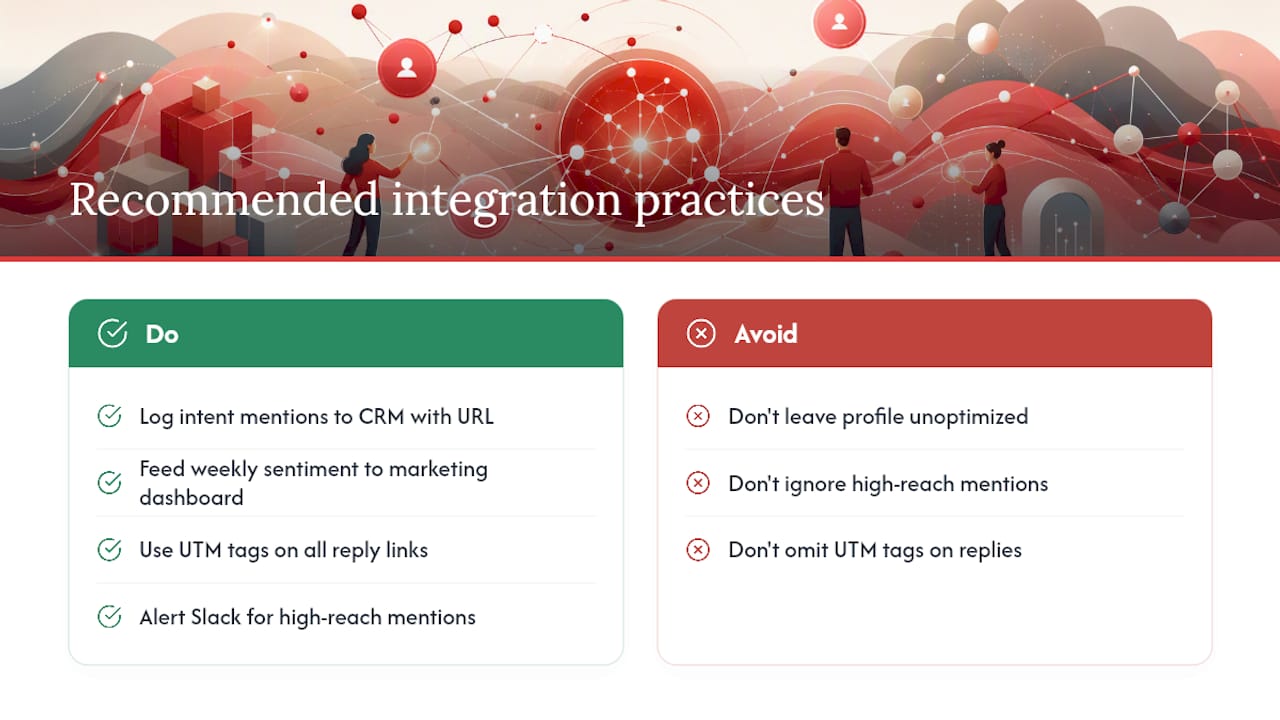
Connect mention data to your CRM: When a mention signals buyer intent (“looking for a tool that does X”), log it as a lead source in your CRM with the post URL, author handle, and estimated reach. Sales teams can then prioritize outreach to accounts that have already expressed interest publicly.
Feed sentiment data into your marketing dashboard: A weekly sentiment ratio trend, pulled from your mention log, gives your marketing team an early warning system for brand health shifts. A sudden drop in positive sentiment often precedes a spike in support tickets or a PR issue.
Use UTM parameters on all reply links: Every link you share in a public reply should carry a UTM source tag (e.g., utm_source=x_mention&utm_medium=reply). This closes the attribution loop in Google Analytics or your preferred analytics platform and lets you calculate mention-to-conversion rate.
Sync mention categories with your product backlog: Product feedback mentions, logged with the original post URL and author handle, give your product team a direct line to user sentiment. Tools like Linear or Notion can receive these as structured entries via Zapier or a native integration.
Set up automated alerts for high-reach mentions: Any mention from an account with over a defined follower threshold (e.g., 10,000 followers) should trigger an immediate Slack alert to the brand manager. High-reach mentions move fast and require faster responses than standard queue processing allows.
Build a weekly mention digest: A one-page summary covering mention volume, sentiment ratio, top mentions by reach, and response rate gives leadership a clear picture without requiring them to live inside the monitoring tool. Automate this export from your listening tool or build it manually from your query log.
Optimizing your Twitter profile for conversion matters here too. Mention-driven traffic lands on your profile before it lands on your website — a weak bio or pinned post loses the conversion that the mention just earned you.
Why mentions are the most underrated signal for tech and AI brands
Most tech brands treat X mentions as a customer service queue. That framing misses the bigger picture. Mentions are a compounding discovery asset.
When your brand name appears consistently in conversations on X — across different accounts, different contexts, different use cases — it builds a public record of relevance. That record is indexed by search engines, scraped by research tools, and increasingly, fed into the retrieval systems that power large language models. A brand that generates 500 genuine mentions per month is more likely to appear in an AI-generated category overview than a brand that generates 50, regardless of how polished their website copy is.
For tech and AI brands specifically, this matters more than in almost any other category. Your buyers are technical. They research on X before they research on Google. They trust peer mentions over marketing copy. A single thread from a respected developer or founder mentioning your product can drive more qualified pipeline than a month of paid search.
The tactical advice in this article — the three searches, the triage matrix, the creator surge playbook — is not just about managing mentions. It is about manufacturing the conditions for compounding visibility. Every mention you earn today is a data point that makes the next mention more likely.
What Nowix delivers for brands that want more mentions on X
Nowix engineers mention momentum for tech and AI brands. The fastest path to a measurable lift in mention volume is a coordinated creator surge: up to 700 vetted micro-KOLs posting within a defined launch window, seeding your timeline with genuine reactions that paid momentum tips into organic coverage.
A typical Nowix engagement delivers three things:
- Launch campaign: A coordinated creator wave on Day 0, with briefed micro-KOLs posting within a 60-minute window to spike mention volume and signal momentum to the algorithm.
- Post amplification: Controlled QRTs and comments from vetted accounts to extend the reach of your highest-performing posts beyond your existing audience.
- Full X account management: Daily content, replies, community engagement, and mention monitoring handled by practitioners who know the platform’s rhythm.
In the first 30 days, you get a creator brief, a launch plan, and a mention baseline. By Day 60, you have a functioning amplification workflow and a sentiment trend to report. By Day 90, mention volume is a managed metric, not a surprise.
Ready to build a mention strategy that compounds? See how Nowix amplifies reach on X or explore full X account management to find the right starting point for your brand.
Sources
- How to Track Mentions on Twitter (X) in 2026: The Complete Playbooks
- First Monday research (social listening tuning)
- How to Use Twitter/X: The Complete Guide for 2026