
Yes, marketers should use Twitter Spaces, but only with a real system behind it. The one-line strategy: pick a niche topic, run it on a fixed weekly slot, and squeeze every session into a repurposing plan before you go live. Your move in the next 24 hours: guest on three existing Spaces in your niche, or schedule your first one if you already have a following worth talking to.
TL;DR:
- Scheduling Spaces and selecting highly specific topic tags enhance discoverability and attract targeted audiences, especially when promoted consistently and well in advance.
- Limiting to three speakers and inserting regular recaps maintain focus, and recording sessions in advance ensures valuable content is preserved.
- Engaging formats like interviews, roundtables, teardowns, and AMAs are most effective when repurposed into clips, threads, and quote cards for prolonged outreach.
- Tracking peak concurrent listeners, retention, replays, and follower gains helps evaluate content quality and adjust format or topics accordingly.
- Proper audio setup, green-room testing, moderating hostile callers swiftly, and integrating Spaces into broader campaigns maximize engagement and growth.
Table of Contents
- What Is a Twitter Spaces Strategy, and How Does the Feature Actually Work?
- How Do You Create and Set Up a Twitter Space Step by Step?
- What Makes a Twitter Space Engaging Once You’re Live?
- What’s the Best Promotion Playbook for Growing a Twitter Spaces Audience?
- Which Show Formats Turn One Space Into Weeks of Content?
- What Metrics Actually Prove a Twitter Space Worked?
- Why Trust This Playbook for Running Twitter Spaces
- How Do You Handle Trolling, Hostile Callers, or a Space That Turns Controversial?
- What Tools and Settings Improve Twitter Spaces Audio Quality?
- How Should Twitter Spaces Fit Into a Broader Marketing Campaign?
- What’s the Best Way to Land Guests and Influencers for Higher-Reach Spaces?
- How Do You Keep Listeners Engaged Once the Room Fills Up?
- What Actually Worked (and Didn’t) Testing This Playbook
- Amplify Your Twitter Spaces Strategy Without Building an In-House Audio Team
- Sources
What Is a Twitter Spaces Strategy, and How Does the Feature Actually Work?
A Twitter Spaces strategy is the plan you use to turn live audio rooms on X into a repeatable channel for authority, audience growth, and pipeline, not just a one-off event. Spaces itself is a live audio feature built into X, and the mechanics dictate what your strategy can and can’t do.
A single Space allows the host, some co-hosts, and additional speakers on the “stage,” with unlimited listeners tuning in silently. Hosts can schedule Spaces in advance and select up to three topic tags to help X’s discovery engine surface the room to the right listeners.
That structure makes Spaces feel closer to a phone call than a podcast recording. Listeners can raise a hand and jump in, which produces the intimacy and real-time reply culture threads can’t replicate.
Pro Tip: Recording availability and post-event playback have changed more than once on X. Confirm recording is toggled on before you go live. Losing a strong session because you forgot the setting is the single most avoidable mistake hosts make.
Key constraints that shape format choice:
- Speaker cap of 13 total forces you to choose between an intimate roundtable and a broadcast-style interview.
- No hard time limit, but attention drops sharply past the 45 to 60 minute mark.
- Topic tags max out at three, so specificity beats breadth every time.
- Recording depends on host settings, so confirm it before every session, not after.
How Do You Create and Set Up a Twitter Space Step by Step?
Setup determines half your outcome before a single word gets spoken. Rush this part and you’ll be talking to an empty room with a vague title and zero tags.
- Write an outcome-oriented title. Skip generic phrasing like “Let’s Talk AI.” Use something searchable and specific: “How AI Startups Price Their First Enterprise Deal.”
- Select up to three topic tags, and go narrow. Broad, aspirational tags like “tech” lose to granular tags like “indie SaaS growth” because X’s recommendation engine matches specificity, not ambition.
- Schedule instead of going live cold, unless you already have a large, warm following. A scheduled Space with a countdown gives X time to notify interested followers and gives you time to promote.
- Enable recording in the settings before launch, so the session survives as an asset beyond the live moment.
- Invite co-hosts and speakers 5 to 10 minutes early into the green room. Test audio, confirm everyone’s connection, and align on the first three talking points out loud, before listeners arrive.
That green-room window matters more than most hosts realize. It’s where first-five-minute retention actually gets decided, not during the session itself.
Your pre-Space promotion checklist should include a pinned announcement tweet, at least two scheduled reminder posts, and a cross-post to any Community you belong to. Skipping this step is the most common reason a well-planned Space launches to eight listeners instead of eighty.
What Makes a Twitter Space Engaging Once You’re Live?
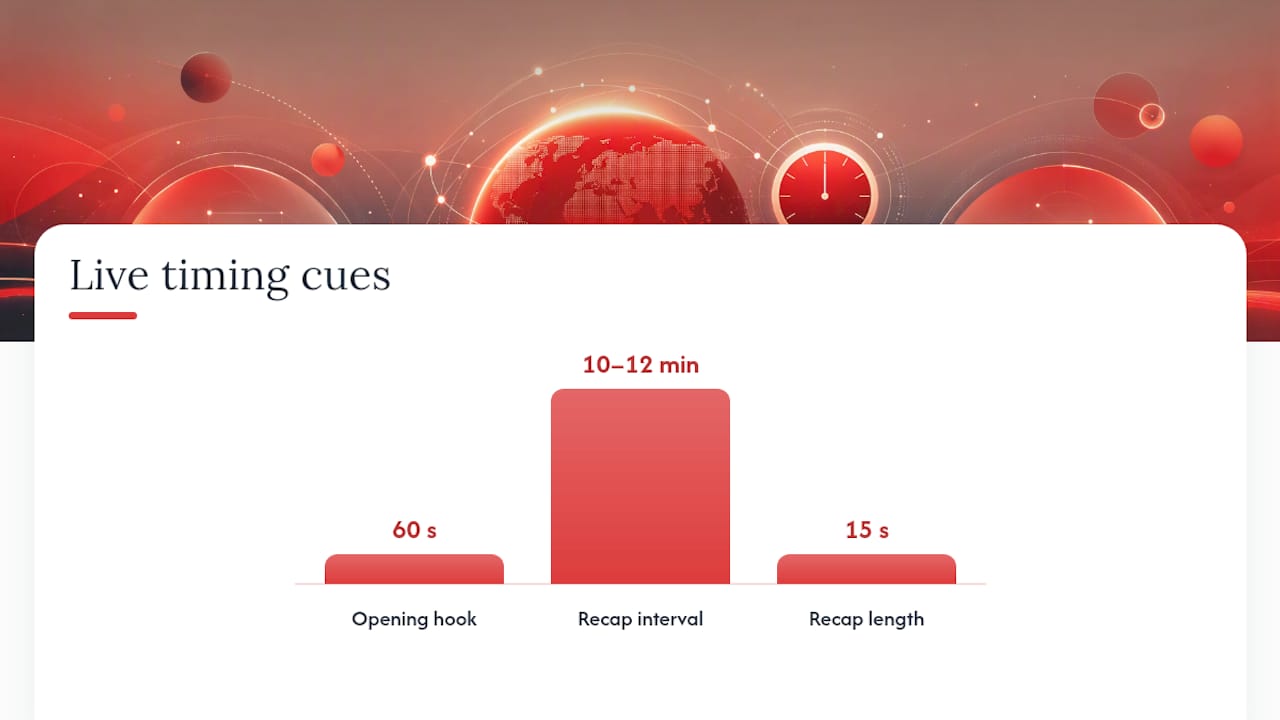
Your opening 60 seconds sets the retention curve for the entire session. State who you are, name the promised outcome in one sentence, and hit listeners with a hook question immediately, before any warmup chatter.
Four formats cover almost every use case:
- Interview: one guest, structured questions, best for introducing a specific expert or founder to your audience.
- Roundtable: three to four voices, best for debate-driven topics with genuine disagreement.
- Teardown: you and a co-host critique a product, campaign, or pitch live, which works well for tech and AI audiences who want tactical detail.
- AMA / Q&A: audience-driven, best once you already have a warm, engaged following willing to raise their hands.
Choosing co-hosts is a strategic decision, not a favor. Co-hosting with accounts that share an overlapping but not identical audience triggers cross-notifications to both follower bases, which is free distribution you don’t get from a solo session.
Screen speaker requests actively during the live show. Letting the stage fill with unscreened voices is how a focused conversation turns into a group chat wandering off-topic.
Pro Tip: Every 10 to 12 minutes, insert a 15-second recap: “So far we’ve covered X and Y, next we’re getting into Z.” It resets attention for listeners who just joined and re-engages anyone drifting.
Close with a direct question back to the audience before wrapping. It’s the single easiest way to generate replies and quote posts once the Space ends.
What’s the Best Promotion Playbook for Growing a Twitter Spaces Audience?
Scheduled Spaces tend to perform better than spontaneous ones. Announcing a topic and guest in advance, then reinforcing it with teaser tweets, drives measurably higher attendance than hitting “start now” and hoping people notice.
Before you host your own room, guest on three to five established Spaces in your niche. This “borrow rooms” approach builds familiarity with hosts who can later co-host your sessions or promote them to their own audience, and it costs you nothing but time.
A reliable announcement cadence looks like this:
- 72 hours out: post the announcement tweet with the title, topic tags, and guest name, then pin it to your profile.
- 24 hours out: send a reminder tweet with a specific reason to attend, not just “don’t forget.”
- 1 hour out: post a final reminder and ask your co-host or guest to cross-promote to their own followers.
- During the Space: encourage speakers to invite their own audience live, since X pushes notifications to their followers too.
Consistency compounds faster than any single promotional push. A fixed weekly or biweekly slot builds audience habit in a way that sporadic, special-event Spaces never do, because listeners learn when to show up without checking your feed first.
Topic tags do double duty here. Beyond helping new listeners discover you, they also feed X’s notification system when a co-host joins, extending your reach into their existing followers automatically.
Which Show Formats Turn One Space Into Weeks of Content?
Format choice should be driven by what you can repurpose afterward, not just what sounds fun to host. Interviews produce quotable soundbites. Roundtables produce debate clips. Teardowns produce tactical threads. AMAs produce direct proof of audience questions and pain points.
The repurposing workflow that actually gets used:
- Record the full session and mark timestamps for your three strongest moments while it’s still live.
- Cut 60-second clips from those timestamps within 24 hours, while the topic is still fresh.
- Write a summary thread hitting the main arguments, published the day after the live session.
- Publish quote cards pulling the sharpest one-liners from you or your guest.
- Share the replay link with a short recap caption for anyone who missed it live.
Spacing that output over two to three weeks rather than dumping it all at once keeps your topic circulating in front of new audiences long after the live room closed. Pull specific topic ideas from your ongoing content calendar so each Space slots into a broader publishing rhythm instead of existing as an island.
What Metrics Actually Prove a Twitter Space Worked?
Four numbers tell you almost everything: peak concurrent listeners, average retention, replay counts, and follower gain during and immediately after the session. Retention matters more than peak listener count, because a room that holds 40 people for 45 minutes signals real content fit in a way that a room that spikes to 200 and drains to 20 within ten minutes does not.
| Metric | What it tells you |
|---|---|
| Peak concurrent listeners | Reach ceiling for that session |
| Average retention | Whether the content actually held attention |
| Replay counts | Post-live demand and repurposing value |
| Follower gain | Direct audience growth attributable to the Space |
Beyond the numbers, track qualitative signals: reply quality, DMs you receive afterward, and any downstream signups or lead activity you can trace to the session.
Retention is the stronger signal of content fit than raw listener count, which is why a niche Space with 30 loyal listeners can outperform a broad one with 300 who leave in five minutes.
Use a simple decision rule after each session: if promotion, retention, and downstream signal are all strong, keep the format as is. If promotion worked but retention lagged, change the topic or guest before you touch anything else. If none of the three moved, stop that format and test a different one. For a deeper breakdown of tracking growth over multiple sessions, the Twitter growth playbook for tech brands walks through longer-term measurement.
Why Trust This Playbook for Running Twitter Spaces
This guidance comes from Nowix’s work running X campaigns and account management specifically for tech and AI brands, where live audio sits alongside daily content, replies, and community engagement as part of a coordinated growth system, not a standalone tactic.
The tactical detail here draws on:
- The Twitter content ideas playbook for generating Space topics that actually match what your niche is searching for.
- The Twitter mention strategy guide for turning post-Space replies and DMs into real follow-up.
- The Twitter trend monitoring framework for timing Spaces to conversations already gaining traction.
How Do You Handle Trolling, Hostile Callers, or a Space That Turns Controversial?
Live audio has no delete button. Once a hostile speaker gets the mic, the damage happens in real time, in front of everyone listening.
Screen speaker requests before granting stage access, especially on any topic with even mild controversy potential. A quick glance at a requester’s profile, recent posts, and reply history catches most bad actors before they ever speak.
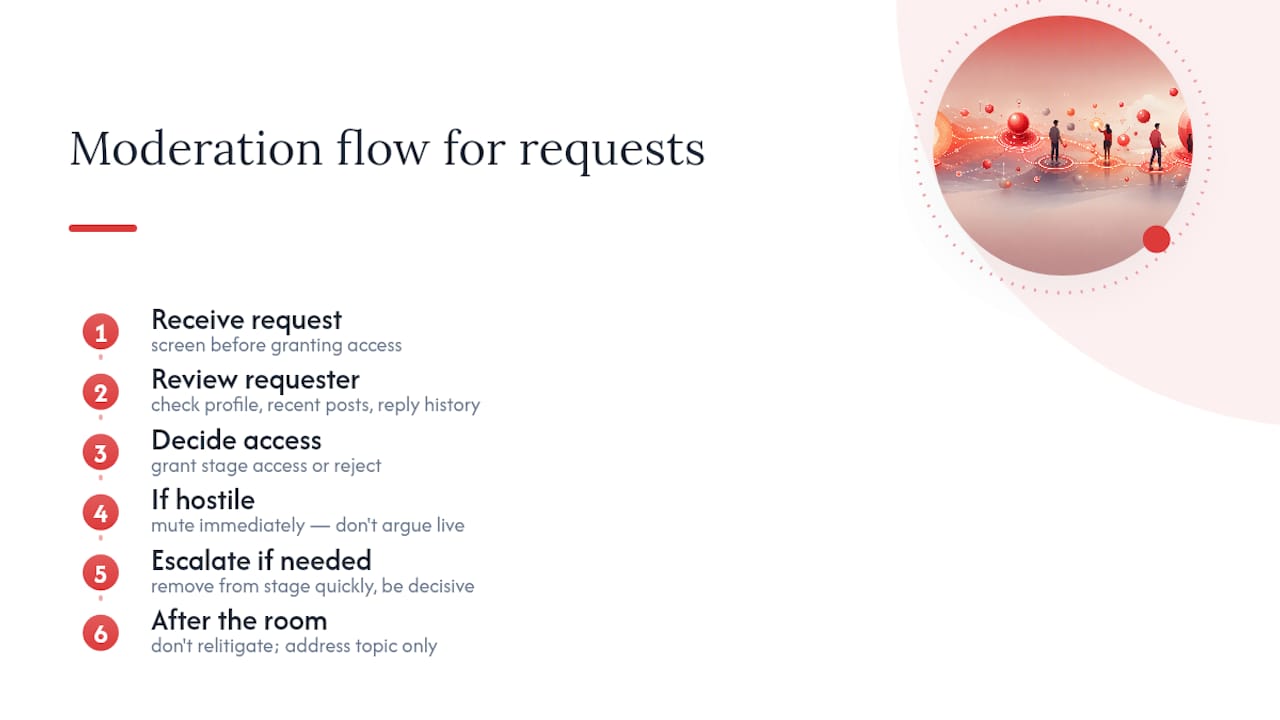
If a speaker turns hostile or derails the conversation, mute them immediately and move on. Don’t argue live. Arguing gives the disruption more airtime and signals to listeners that the host has lost control of the room.
As host, you can remove a speaker from the stage entirely, and you should do it fast rather than hoping the conversation self-corrects. A three-second pause to remove someone reads as decisive. A two-minute back-and-forth reads as chaos.
Set a light ground rule at the open of any topic likely to draw disagreement: “We’re debating ideas, not attacking people.” Stating it once up front gives you something concrete to point back to if things get heated.
Pro Tip: Keep a co-host whose only job is moderation during contentious topics. Splitting “run the conversation” from “watch the stage” means neither job gets neglected when a room turns tense.
Afterward, don’t relitigate the incident in a follow-up thread. Address the topic substance if useful, and let the moderation moment fade rather than giving it a second life in your content calendar.
What Tools and Settings Improve Twitter Spaces Audio Quality?
Bad audio kills a Space faster than a bad topic. Listeners tolerate an awkward pause. They don’t tolerate crackling, echo, or a host who sounds like they’re calling from inside a tunnel.
Wired headphones with a built-in microphone beat both AirPods and a laptop’s internal mic for consistency, since Bluetooth connections occasionally introduce lag or dropouts mid-sentence. If you’re hosting regularly, a basic USB microphone is a worthwhile investment; even an entry-level model outperforms most built-in laptop hardware by a wide margin.
Close background apps that eat bandwidth before you go live, and confirm your Wi-Fi signal rather than relying on cellular data if you have the choice. A hardwired connection is the most reliable option when it’s available.
Test audio with every co-host and speaker during the green room, not after listeners arrive. Ask each person to say a full sentence and confirm you can hear them clearly, catching one-sided audio issues before they become a live problem.
Record in a room with soft surfaces where possible. Hard walls and empty rooms create an echo that’s subtle to the speaker but obvious to listeners on headphones.
How Should Twitter Spaces Fit Into a Broader Marketing Campaign?
A Space works best as one node in a bigger system, not a standalone event you run and forget. Treat each session as both a content source and a promotional moment for whatever campaign you’re already running.
Time a Space around a product launch, a funding announcement, or a research release, and use it to go deeper on the topic than a tweet thread allows. The live Q&A format gives prospects and press a chance to ask direct questions your written content can’t anticipate.
Feed the clips, quote cards, and summary thread generated from a Space directly into your existing content calendar rather than treating them as bonus material. That’s the difference between a Space that generates one week of content and one that generates three.
Cross-promote Spaces through email newsletters, LinkedIn posts, and any Discord or Slack community you run, since your audience on those channels may never see the announcement tweet. A campaign that only lives on X is leaving reach on the table.
What’s the Best Way to Land Guests and Influencers for Higher-Reach Spaces?
The right guest does two things at once: they bring their own audience into your room, and they lend the topic instant credibility you couldn’t manufacture solo.
Target guests with an audience that overlaps yours without duplicating it entirely. A guest whose followers are identical to yours brings little incremental reach; a guest whose audience is adjacent, say a developer-tool founder for an AI marketing Space, extends you into genuinely new territory.
Pitch guests with specifics, not a vague invite. Name the topic, the format, the expected length, and exactly what you want from them, whether that’s a hot take, a case study, or a live critique.
Give guests co-host status rather than just speaker access whenever possible. Co-hosts get promotional tools and visibility that plain speakers don’t, which means they’re more invested in helping you promote the session beforehand.
After the Space, credit the guest explicitly in your recap thread and tag them in every repurposed asset. Guests who see genuine promotional value from appearing are the ones who say yes to a second invitation, and eventually start inviting you onto their own rooms.
How Do You Keep Listeners Engaged Once the Room Fills Up?
Engagement during a live Space is a moderation job as much as a content job. The two blur together the moment listeners start requesting the mic.
Ask a direct question within the first two minutes and invite listeners to raise their hand in response. That early interaction signals the room is participatory, not a lecture, and it primes people to speak up again later.
Rotate speaking time deliberately rather than letting one voice dominate. If a speaker has made their point and starts repeating it, a polite redirect (“that’s a great point, let’s bring in someone else”) keeps the energy moving without embarrassing anyone.
Watch the listener count in real time. A sudden drop usually means the conversation has drifted off-topic or a segment ran too long; that’s your cue to redirect back to the promised outcome from your opening line.
Thank new speakers by name when they join the stage. It costs nothing and makes first-time callers far more likely to speak up again on a future Space.
Close every session with a clear next step: follow for the next episode, reply with a specific question, or check a linked resource. A Space that ends without a direct ask wastes the attention it just earned.
What Actually Worked (and Didn’t) Testing This Playbook
Three patterns show up again and again. Testing a fixed weekly slot across three episodes can build more momentum than scattered special events, because listeners start showing up without a reminder by episode three. A co-host partnership with an adjacent, not identical, audience reliably lifts new-listener counts more than any paid promotion could. And a strong repurposing pass, clip first, thread second, turns a 40-listener room into a piece of content that outperforms the live session itself.
The failure worth naming: skipping the green room. A session launched cold, without testing co-host audio first, lost half its listeners in the first three minutes to a crackling mic. The fix is boring but absolute: never skip the 5 to 10 minute audio check, no matter how rushed the schedule feels.
Map those lessons onto your own first three sessions, and you’ll skip the mistakes that usually take new hosts a dozen tries to unlearn.
Amplify Your Twitter Spaces Strategy Without Building an In-House Audio Team
Nowix gets your Spaces strategy in front of the right audience fast, without you spending months building follower relationships from zero. Where the borrow-rooms tactic and organic co-hosting take patience to compound, Amplify Your Reach on X puts controlled amplification, quote-retweets and comments from vetted micro-influencers, behind your announcement tweets and post-Space clips so the right people see them the first time you post, not the fifth.
A typical engagement starts with a short consultation on your current X presence and campaign goals, followed by an audit of your recent content and audience overlap opportunities. From there, Nowix builds the amplification plan around your Spaces calendar, so your pinned announcements, reminder tweets, and repurposed clips all get coordinated push rather than competing for organic reach on their own. If you already have a Space scheduled or a launch coming up, the next step is booking that initial consultation to see what a coordinated push around it would look like.
If your goals extend past amplification into daily content, replies, and full account management, that’s a separate conversation worth having once you see how amplification performs on its own.
For readers building out analytics beyond X’s native numbers, Prescy offers AI visibility tracking and reporting that can sit alongside your Spaces metrics for a fuller picture of downstream impact.
Sources
- Twitter Spaces: Your Complete Guide to Getting Started
- How to Host an X Space in 2026: Requirements, Setup, Step by Step | Postory
- Twitter Spaces Strategy 2026: Build Authority Through Audio
Recommended
- Tuesday 9 AM Wins: How Tech and AI Teams Test the Best Time to Tweet
- How to Launch an AI Product on Twitter: The Founder’s Playbook
- Tweet Frequency for Brands: The 2026 Data-Backed Playbook
- Twitter Growth Playbook for Tech Brands 2026
Frequently asked questions
What should be ready before a brand launch on X?
Prepare the approved announcement, audience, product proof, destination link, publishing owner and follow-up plan. Where creators are involved, confirm the brief and delivery window.
Can a launch plan guarantee a trend or sales?
No. Agree the work and reporting before launch, then measure delivered activity, observed reach and recorded website actions separately.