Twitter Trend Monitoring: A Marketer’s Real-Time Playbook

The fastest way to monitor Twitter trends is a hybrid workflow: a real-time tracking layer for alerts and dashboards, paired with a historical analytics layer for exports and reports. Run both, and you catch a trend the moment it breaks while still having the data to prove whether it mattered.
Do this first. Pick three to five keywords or hashtags tied to your brand or category, set one alert with a volume threshold, and assign a single owner to triage it. That’s the entire setup cost of getting started today. Everything else in this guide is refinement.
- Track your brand name, product names, common misspellings, and your executive’s names, since a lot of brand conversation happens with zero @mentions.
- Set one real-time alert on a volume spike (not a static keyword count) so you get pinged only when something actually shifts.
- Pull a 24-hour historical view once daily to catch anything your real-time layer missed overnight.
- Route the alert to a named person or Slack channel, never to a shared inbox nobody owns.
- If the trend touches a live launch, a crisis, or a competitor moment, escalate to a team (internal or agency) that can mobilize creators within the hour, not the week.
Tweets have an average lifespan of just 15 to 30 minutes before they scroll into irrelevance, which is exactly why manual, once-a-day checking fails marketers who need to catch a moment while it’s still live.
Pro Tip: Don’t wait for a “big” trend to test your workflow. Run it on a small, predictable spike, like an earnings call mention, so you know your alert-to-action time before a real crisis puts it under pressure.
Key Takeaways
A hybrid workflow, real-time alerts layered on historical analytics with clear team routing, is what turns Twitter trend data into action instead of noise.
| Point | Details |
|---|---|
| Set one alert first | Pick three to five brand or category keywords and configure a single volume-based alert before adding complexity. |
| Separate your streams | Route brand health, competitor mentions, and campaign hashtags to different owners to prevent alert fatigue. |
| Judge trends on persistence, not just volume | A spike that keeps climbing over several hours with real author reach is worth acting on; a one-hour blip usually isn’t. |
| Confirm legal and platform terms before scraping | Rely on approved API access rather than unsanctioned scraping, and check current platform policies when unsure. |
| Escalate to Nowix when speed matters most | Nowix mobilizes up to 700 vetted creators within an hour for amplification when a trend or launch needs an immediate, managed push. |
Table of Contents
- What Are the Best Tools for Twitter Trend Monitoring?
- Which Metrics Actually Matter for Twitter Trend Analysis?
- How Do You Build a Real-Time Alert and Routing Workflow?
- Why Do False Positives Happen, and How Do You Filter Them Out?
- How Do You Turn a Trend Signal Into an Actual Strategy?
- What Are the Legal and Ethical Limits of Monitoring Twitter Trends?
- What Does the First 60 Minutes of a Trend Response Actually Look Like?
- How Can Nowix Help When a Trend Needs an Immediate Response?
- Where Can You Learn More About Trend Monitoring and Setup?
- Sources
What Are the Best Tools for Twitter Trend Monitoring?
No single tool covers everything you need. Self-serve dashboards handle day-to-day hashtag and mention tracking. Enterprise platforms add sentiment scoring and geographic breakdowns. Managed services step in when you need creators mobilized and posts amplified within the hour, not just a dashboard telling you something is happening.
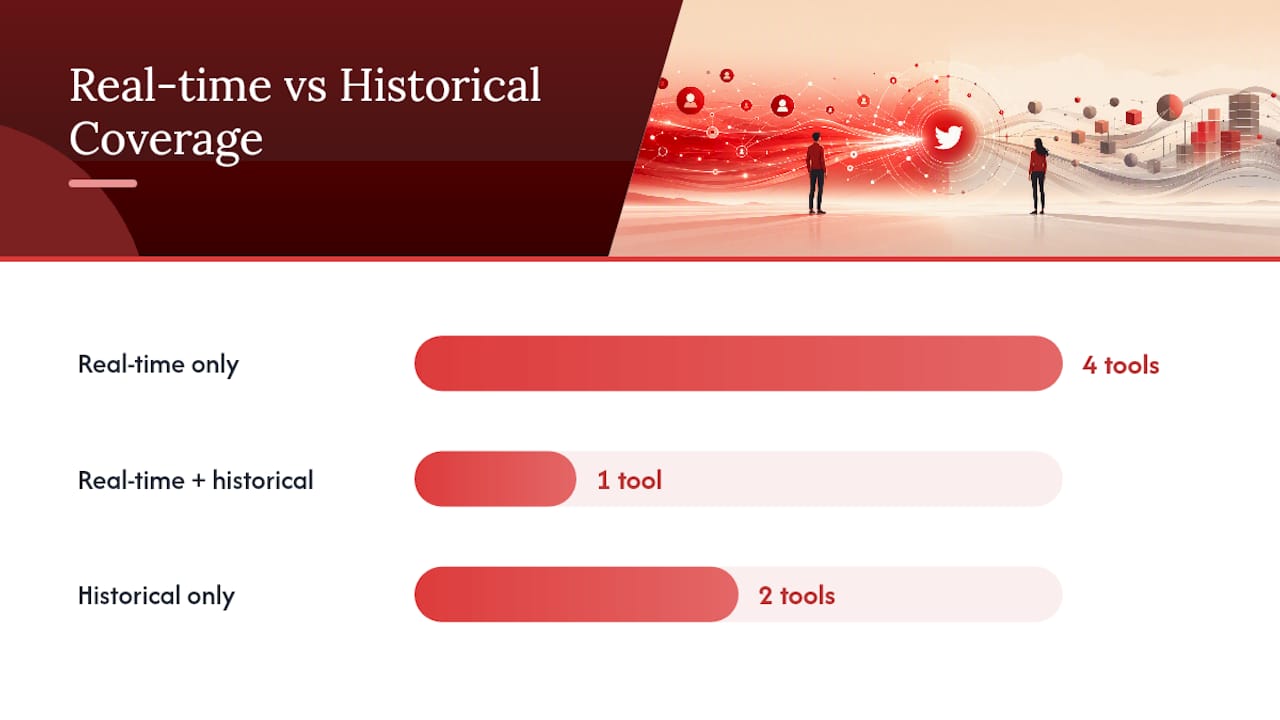
Here’s how the major players stack up on the axes that actually decide a purchase:
| Tool | Best For | Real-Time vs. Historical | API / Export / Reports | Influencer Discovery | Sentiment / NLP | Geo Filtering | Pricing / Free Tier |
|---|---|---|---|---|---|---|---|
| Nowix | Managed amplification and urgent campaign escalation | Real-time monitoring plus rapid creator activation | Campaign reports on request | Vetted micro-creator network | Human judgment on trend fit | Yes, campaign-specific | Project and retainer pricing |
| TweetDeck (X Pro) | Quick manual monitoring and live triage | Real-time only | No formal export | No | No | No | Free |
| Google Alerts | Free baseline web and mention alerts | Real-time (delayed indexing) | Email digest only | No | No | No | Free |
| Hashtagify | Hashtag discovery and trend spotting | Real-time | Limited export | Basic | No | No | Free tier available |
| TrackMyHashtag | Hashtag campaign analytics and historical exports | Historical-focused | CSV export, PDF reports | No | Basic | No | Paid, tiered |
| Tweet Binder | Event and campaign wrap-up reports | Historical-focused | PDF/CSV reports | No | Basic | No | Paid, tiered |
| Keyhole | Campaign tracking and influencer discovery | Real-time and historical | API and reports | Strong | Yes | Yes | Paid, tiered |
| Mention | Real-time alerts and team routing | Real-time | API, CSV export | No | Basic | Yes | Free tier available |
| BuzzSumo | Trending topic discovery for content teams | Historical-focused | CSV export | Limited | No | No | Paid, tiered |
| Hootsuite | Cross-channel trend research and team dashboards | Real-time and historical | API, exports | Basic | Yes | Yes | Paid, tiered |
| Sprout Social | Integrated publishing plus listening | Real-time and historical | API, reports | Basic | Yes | Yes | Paid, tiered |
| Agorapulse | Social inbox and listening for midmarket teams | Real-time and historical | Reports | Basic | Basic | Limited | Paid, tiered |
| Audiense | Audience segmentation and community mapping | Historical-focused | Export, API | Strong | Basic | Yes | Paid, tiered |
| BrandMentions | Brand health monitoring and broad web coverage | Real-time and historical | API, reports | No | Yes | Yes | Paid, tiered |
| Meltwater | Enterprise brand intelligence and PR teams | Real-time and historical | API, enterprise reports | Basic | Yes | Yes | Enterprise pricing |
| Brandwatch | Enterprise social listening at scale | Real-time and historical | API, custom dashboards | Basic | Yes | Yes | Enterprise pricing |
| Talkwalker | Enterprise listening with visual and NLP analysis | Real-time and historical | API, reports | Basic | Yes | Yes | Enterprise pricing |
| Sprinklr Social Listening | Enterprise-scale unified customer experience monitoring | Real-time and historical | API, dashboards | Basic | Yes | Yes | Enterprise pricing |
| Rival IQ | Competitive benchmarking and social analytics | Historical-focused | CSV export, reports | No | Basic | No | Paid, tiered |
| Kwatch.io | Lightweight keyword and mention alerts | Real-time | Basic export | No | No | No | Paid, tiered |
| Mentionlytics | Multi-language mention monitoring and sentiment | Real-time and historical | API, reports | Basic | Yes | Yes | Paid, tiered |
TweetDeck (now X Pro) remains the fastest way to eyeball a live search or list, and it costs nothing. Google Alerts covers the basics for brand-name mentions outside X, though its delay makes it unsuitable for anything urgent. TrackMyHashtag and Tweet Binder both specialize in the post-event report, the kind of PDF you hand a client after a conference hashtag runs its course.
Where most of these tools stop is amplification. Hashtagify tells you a hashtag is climbing. Keyhole tells you who’s driving it. None of them mobilize creators to ride that wave before it dies. That’s the gap Nowix exists to close: agency-managed monitoring paired with the ability to activate up to 700 creators within an hour when a trend is worth riding hard. If your team needs a dashboard, pick from the list above. If your team needs someone to act on what the dashboard shows, that’s a different job entirely.
Which Metrics Actually Matter for Twitter Trend Analysis?
Volume alone tells you almost nothing. A hashtag spiking from 50 to 500 mentions sounds dramatic until you realize it’s still statistically small. The metrics below are the ones that separate a real signal from background noise.
- Volume: raw mention or hashtag count over a set window, useful only as a baseline for comparison, never in isolation.
- Reach and impressions: how many unique timelines a topic could theoretically hit, which tells you the ceiling of a trend’s visibility.
- Engagement rate: replies, retweets, quote tweets, and likes divided by impressions, the number that tells you whether people are actually reacting or just scrolling past.
- Retweet-to-quote ratio: a high quote-tweet share usually signals active commentary and debate, while pure retweets often mean passive amplification.
- Author reach: the combined follower count of accounts driving the conversation, which flags whether a handful of large accounts or thousands of small ones are fueling it.
- Sentiment signal: the rough positive, negative, or neutral tilt of the conversation, critical for catching a brand crisis before it snowballs.
- Velocity: the rate of change in mentions per hour, often more useful than raw volume for catching something building fast.
- Trend persistence: how long a topic keeps appearing in rankings, which Trends24 tracks well through its longest-trending and most-tweeted lists.
For live events, velocity and author reach matter most, since you’re reacting in real time. For brand health tracking, sentiment and persistence carry more weight, because a single angry thread that fades in an hour isn’t the same threat as one that’s still climbing after a day. For campaign amplification, engagement rate and the retweet-to-quote ratio tell you whether your content is landing or just circulating.
Pro Tip: Track the ratio between quote tweets and plain retweets, not just total volume. A 2026 engagement benchmark set from Nowix shows that spikes heavy on quote tweets tend to hold attention longer than spikes driven by passive retweets, which usually die out within a few hours.

How Do You Build a Real-Time Alert and Routing Workflow?
Setting this up takes an afternoon, not a sprint. The steps below assume you’re building this inside whatever tool you already picked from the comparison above.
- Define your streams. Separate brand mentions, competitor mentions, and category or campaign hashtags into distinct monitoring streams instead of one giant keyword soup.
- Build your keyword and author lists. Include misspellings, product names, and executive names, since much of the relevant conversation skips the @mention entirely.
- Set volume and sentiment thresholds. A flat number rarely works across accounts of different sizes, so tie your threshold to a multiple of your normal hourly average instead.
- Choose delivery channels. Slack for anything needing a same-hour response, email digests for daily roundups, and webhooks if you’re feeding a dashboard or automation tool.
- Assign named owners. PR gets crisis-adjacent sentiment swings, growth gets campaign hashtag spikes, and support gets service-complaint mentions.
Threshold rules work best when they’re tied to action, not just noise:
- A volume spike above three times your rolling hourly average triggers a Slack ping to the on-call marketer.
- A sudden negative sentiment swing on a brand keyword triggers immediate escalation to PR, not a daily digest.
- A pickup from an account with more than 50,000 followers triggers a review of whether the moment is worth amplifying.
Splitting these streams by team is what prevents alert fatigue from setting in after week one. When every alert lands in the same channel, people stop reading them within days. Segment brand health, competitor complaints, and buying-intent signals into separate routes, and each team only sees what’s actually theirs to act on.
Pro Tip: Give every alert an expiration. If nobody acts on a flagged spike within four hours, auto-close it. Stale alerts pile up and train your team to ignore the channel entirely.
Why Do False Positives Happen, and How Do You Filter Them Out?
A trend that looks huge on a dashboard can be almost meaningless in practice, and the reverse is just as common.
Sampling bias is the biggest culprit. Many tools, including the free tiers of most listening platforms, only capture a percentage of matching posts rather than the full firehose, which means small but real spikes sometimes never surface at all. Bot amplification compounds the problem: a handful of automated accounts retweeting each other can inflate volume without reflecting any genuine audience interest. Locale tailoring adds another layer, since a topic trending heavily in one region might barely register elsewhere, making a “global” trend claim frequently overstated.
- Exclude generic, high-volume hashtags (#love, #trending, #news) from your core tracking lists, since they generate constant false positives with zero brand relevance.
- Apply a lookback window of at least seven days before calling something a trend, rather than reacting to a single-hour blip.
- Filter by author credibility, weighting verified or high-engagement accounts more heavily than brand-new or low-activity ones.
- Cross-check any suspected viral moment against a live aggregator like trends24.in to confirm it’s registering outside your own tool.
A reliable practitioner rule: flag a deviation as statistically meaningful only when it clears several multiples of your 7-day rolling hourly mean, not just any noticeable bump. That threshold filters out the daily noise every brand keyword generates and leaves you looking only at spikes worth a second glance.
Pro Tip: Build your baseline before you need it. Pull 30 days of normal mention volume for your top five keywords now, so that when a real spike hits, you already know what “abnormal” looks like instead of guessing under pressure.
How Do You Turn a Trend Signal Into an Actual Strategy?
Spotting a spike is the easy part. Deciding whether it deserves a response, and what that response should be, is where most teams stall.
Start by identifying who’s actually driving the conversation. A trend pushed by three mid-size creators behaves completely differently than one pushed by a single account with a million followers, even if the raw volume numbers look identical. Check for geographic clustering next: a spike concentrated in one country often points to a local news event or regional campaign, while a spread-out spike suggests something with broader cultural pull. Look at whether the conversation is tied to a specific piece of media (a screenshot, a video clip, a headline), since media-anchored trends tend to have a clearer narrative you can respond to directly. Finally, read the actual conversation themes, not just the hashtag, because the same hashtag can carry opposite sentiment depending on which sub-conversation is dominant that hour.
A simple playbook for mapping drivers to action:
- Origin is a major influencer or press outlet, sentiment is positive. Amplify immediately through quote tweets and creator activation.
- Origin is a customer complaint gaining traction. Respond directly and route to support, don’t amplify.
- Origin is unclear or fragmented across unrelated accounts. Investigate before acting. This is often a false positive.
- Origin is a competitor’s move. Monitor closely, but don’t react publicly until the narrative is fully clear.
- Origin is unrelated to your brand despite keyword overlap. Ignore and move on.
Judging whether a spike is campaign-worthy comes down to persistence and reach combined, not either alone. A spike that fades within an hour and stays under a few thousand impressions is background noise. One that’s still climbing after several hours and pulling in accounts with real reach is worth a resourced response. Nowix’s own engineered playbook for tech brands treats this distinction as the entire basis for deciding when to mobilize creators versus when to simply watch and wait.
What Are the Legal and Ethical Limits of Monitoring Twitter Trends?
Monitoring public posts on X is generally permissible under the platform’s own terms, but “public” doesn’t mean “consequence-free.” Scraping data outside of X’s official API terms can violate the platform’s developer agreement, so any tool or workflow you build should rely on approved API access or licensed third-party data rather than unsanctioned scraping.
Ethical practice matters just as much as legal compliance. Quoting or screenshotting a private individual’s post for a brand campaign, even if it’s technically public, can feel invasive to that person and can backfire publicly if handled carelessly. Sentiment and demographic inferences drawn from monitoring tools are estimates, not facts. Treat them as directional signals, not as grounds for targeting individual users. If your monitoring touches health, political, or otherwise sensitive topics, apply extra caution before amplifying or responding, since brand involvement in those conversations carries reputational risk that a simple metric spike won’t capture. When in doubt on a specific legal question, confirm current terms directly with X’s developer policies or consult legal counsel, since platform rules change without much warning.
What Does the First 60 Minutes of a Trend Response Actually Look Like?
Here’s roughly how a trend moment plays out when it’s handled well, based on the workflow patterns described throughout this guide.

Minute zero to five: an alert fires. The on-call marketer checks the source, not just the number, confirming whether it’s a real account or a bot cluster driving the spike. Minute five to fifteen: origin gets identified. Is this a journalist, a competitor, an angry customer, or an unrelated meme that happens to share a keyword? That answer decides everything downstream. Minute fifteen to thirty: messaging gets drafted, even if it’s just a holding statement, because waiting until the trend peaks to start writing is how brands miss their window entirely.
Minute thirty to forty five: the right stakeholders get looped in, PR if it’s reputational, growth if it’s an opportunity, support if it’s a complaint. Minute forty five to sixty: a decision gets made. Amplify, respond, or stand down. If amplification is the call and speed matters, this is the moment a managed partner with a standing creator network has a real advantage over a team still trying to recruit voices from scratch.
None of this works without a threshold that’s already defined before the moment happens. The teams that fumble a trend response almost always fumble it in the first fifteen minutes, not the last. They’re still debating whether the spike is real while the window to act is already closing.
How Can Nowix Help When a Trend Needs an Immediate Response?
Watching a spike happen and doing something about it in the same hour are two different skill sets. Most of the tools covered above are built for the first one. Nowix is built for the second.
When your monitoring dashboard flags a trend worth riding, or a launch that needs a push in its first hour, Nowix mobilizes up to 700 vetted micro-creators to post, quote-tweet, and comment around your campaign within that same hour. That’s the gap self-serve tools can’t close: they tell you something is happening, but they don’t have a creator network standing by to act on it. Nowix’s post amplification service handles controlled quote-retweets and comments from real accounts, and the Go Viral timeline takeover campaigns are built specifically for the launch-day or trend-window scenario where speed decides the outcome.
If your need is more ongoing than urgent, Nowix’s X account management service runs your full presence, strategy, daily content, replies, and community engagement, so trend monitoring becomes something your team reviews rather than something they scramble to staff. Choose managed support when a trend response needs to happen inside an hour and your internal team can’t mobilize creators that fast on its own. Book a call to walk through your current monitoring setup and see where a managed layer would close the gap.
Where Can You Learn More About Trend Monitoring and Setup?
- Hootsuite’s trend research platform explains AI-driven conversation clustering and how it surfaces the underlying drivers of a spike.
- Gramener’s Twitter trends API breakdown shows how platform-level trending topics are calculated and refreshed on a schedule.
- Nowix’s engineered playbook for tech brands walks through tactical benchmarks for deciding when a trend is worth a coordinated push.
- Nowix’s 2026 engagement rate benchmarks give concrete numbers for judging whether a spike in engagement is meaningful.
- Nowix’s guide to finding Twitter influencers is worth reading before you need to activate creators on short notice, not after.
Sources
Real-time coverage and historical coverage come from different places, and confusing the two is a common setup mistake.
Platform-level trend data, the kind that shows up in the native “Trending” panel, comes from an algorithm tuned to surface what’s popular right now in a specific location. Gramener’s breakdown of the Twitter trends API shows this data refreshes roughly every 20 minutes and is deliberately tailored by geography, so a trend in Manila won’t match a trend in Manchester even at the same moment. That’s useful for spotting category-wide moments but nearly useless for tracking your own brand keywords, since your brand almost never surfaces in the native trending panel unless you’re already viral.
For actual keyword and hashtag monitoring, you need either a streaming API connection or a polling setup that checks on a schedule. Streaming gives you near-instant delivery; polling is cheaper but introduces lag depending on your interval. Historical archives fill the gap for reporting: Hootsuite’s trend research platform uses AI-driven clustering to group related conversations and surface the drivers behind a spike, which matters more for after-the-fact analysis than live triage.
Exports matter as much as the data itself. CSV works for spreadsheet analysis, JSON for feeding your own dashboard, and PDF for the client-facing wrap-up report. If a tool only offers one of these, know that limitation before you commit budget to it.
Rate limits and sampling are the two things every monitoring setup underestimates. A “real-time” feed that samples 10% of matching tweets will miss spikes that happen in bursts, and a polling interval of 20 minutes can make a 15-minute viral moment disappear before your dashboard ever refreshes.
- trend-research
- Trends24