
For paid X ads, use utm_source=twitter and utm_medium=paid_social. For organic posts, use utm_source=twitter and utm_medium=organic. That pairing matches GA4’s Default Channel Grouping automatically, which is the entire point. Manual UTMs remain non-negotiable because X’s own click ID, twclid, only feeds X’s native reporting. Run both, and validate your redirect chain before launch.
TL;DR:
- Validating redirect chains with real clicks is the most costly mistake, as parameters can be silently stripped before reaching GA4.
- Use both manual UTMs and X’s native click ID (
twclid) to accurately track campaign performance, especially since GA4 often missestwcliddata.- Maintain consistent naming conventions, including campaign IDs, to prevent fragmentation and ensure accurate historical tracking.
- Build and test fully tagged URLs in advance, using incognito mode and GA4’s real-time reports to confirm parameters survive the redirect chain before deployment.
- A centralized UTM template repository and pre-launch checklist streamline scaling and reduce errors across multiple creators and campaigns.
Table of Contents
- Twitter UTM Tracking Templates You Can Copy Right Now
- Adding UTM-Tagged Links to X Ads and Organic Posts
- Naming Conventions That Keep Your Reports From Fragmenting
- How to Validate a UTM Link Before It Ever Goes Live
- Reading Twitter Campaign Traffic Correctly in GA4
- Tools That Actually Reduce UTM Errors at Scale
- The Preflight Checklist Run Before Every Launch
- Why Most Teams Overthink UTM Setup and Underthink Validation
- How Tracking Is Handled So You Don’t Have To
- Where to Verify This Yourself
- Sources
- FAQ
Twitter UTM Tracking Templates You Can Copy Right Now
Copy-paste these, swap the campaign details, and you’re tagging links correctly within minutes. The five standard UTM parameters, utm_source, utm_medium, utm_campaign, utm_content, and utm_term, do the actual work of labeling your traffic.
Paid ad, video creative:
?utm_source=twitter&utm_medium=paid_social&utm_campaign=spring_launch_tw12345&utm_content=video_v1&utm_id=tw_12345
Organic tweet in a thread:
?utm_source=twitter&utm_medium=organic&utm_campaign=evergreen_series&utm_content=thread-cta
Bio link:
?utm_source=twitter&utm_medium=organic&utm_campaign=bio_link_q1&utm_content=profile
Notice the campaign name carries both a readable label and a numeric ID (spring_launch_tw12345). That’s deliberate.
Pro Tip: Name-only tags are easy to read in a dashboard, but they break if someone renames the campaign mid-quarter. ID-only tags never break, but nobody can eyeball what they mean. The name+ID pattern gives you both: readability now, stable joins later.
Adding UTM-Tagged Links to X Ads and Organic Posts
X Ads Manager has no dynamic macros. Whatever URL you paste into the Website URL or Card URL field is the exact URL that fires, typos and all, according to UTM Generator’s breakdown of X Ads behavior. That single fact is why teams that skip templates end up with a dozen slightly different utm_campaign values for one launch.
Here’s the practical sequence:
- Build the full UTM-tagged URL in a shared builder or spreadsheet before you ever open Ads Manager.
- Paste the completed URL into the ad’s destination field. Never paste a bare URL and plan to “add UTMs later.”
- Assign a distinct
utm_contentvalue per creative variant (video_v1, carousel_slide2, static_hero) so you can tell which asset actually converted. - For quote tweets and threads, give each tweet its own
utm_contenttag rather than reusing the parent post’s tag. - Replace your generic bio link with a UTM-tagged short link, tagged
utm_medium=organic, so profile-driven traffic doesn’t vanish into “direct” in GA4.
Pro Tip: Keep one master spreadsheet of every live URL and its tags. When someone asks “what’s driving the spike in paid_social traffic,” you want an answer in thirty seconds, not a scavenger hunt through old Ads Manager campaigns.
Naming Conventions That Keep Your Reports From Fragmenting
Consistency is the whole game here. Switch your source or medium naming halfway through a quarter, and you split what should be one continuous trend line into two disconnected fragments, permanently.
- Always use
utm_source=twitter, notx, unless you’ve built and maintain a custom channel group in GA4. GA4’s Default Channel Grouping recognizestwitterfor routing traffic into Paid Social and Organic Social buckets correctly, and there’s no upside to fighting that default. - Use
paid_socialfor every paid X placement instead ofcpc. GA4 can misclassifycpctraffic as Paid Search rather than Paid Social, which quietly corrupts your channel comparisons. - Lowercase everything. Underscores, not spaces or hyphens, inside parameter values.
- Include a campaign ID alongside the readable name so renamed or archived campaigns still join cleanly in historical reports.
- Keep one central UTM template repository that the whole team pulls from, not five people building tags from memory.
How to Validate a UTM Link Before It Ever Goes Live
X’s link shortener, t.co, typically preserves your full query string on the way through. The real threat sits downstream: your own CDN, a vanity domain, or a third-party shortener bolted onto your funnel can silently strip parameters before the click ever reaches your landing page, according to Missing Linkz’s redirect-chain research.
Run this sequence on every new template, not just the first campaign:
- Build the tagged URL and open it in an incognito window to trigger a real click, not a preview.
- Check the final landing-page URL in your browser bar. If the query string is gone, something in the chain ate it.
- Confirm arrival in GA4’s real-time report, filtering for
twitteras source. - Preview the tag in Google Tag Manager if GTM handles any of your conversion firing, so you catch a misconfigured trigger before spend starts.
- Only then push the link into Ads Manager or schedule the organic post.
Pro Tip: A redirect-chain checker takes thirty seconds and catches the single most expensive mistake in this entire workflow: an ad running for days with a link that drops its tags. Validate first, spend second.
Reading Twitter Campaign Traffic Correctly in GA4
Open Acquisition, then Traffic Acquisition, and filter Session source/medium for twitter / paid_social or twitter / organic. That split is what tells you whether your budget or your unpaid posting is actually moving the needle.
- Match spend to sessions by joining on
utm_idor a campaign ID lookup table, since Ads Manager reports spend by campaign object, not by UTM string. - Treat X Ads’ native numbers, tied to
twclid, as your source of truth for click volume and cost. GA4’stwclidblind spot means it can’t natively attribute sessions to that click ID, which is exactly why manual UTMs have to ride alongside it on every link. - Use GA4 for what it’s actually built for: on-site behavior, conversion counts, and revenue, then reconcile that against X’s click and spend figures for a full cost-per-conversion picture.
Native X reporting and GA4 will rarely match to the decimal. Statweestics notes that platform-side click counts often lag or count differently than destination analytics, so treat the gap as expected, not broken. For a broader view of how these numbers feed attribution models, a marketing attribution tool can pull UTM data into a single cross-channel report instead of two separate dashboards you’re manually reconciling.
Tools That Actually Reduce UTM Errors at Scale
Three categories of tools matter here, and picking the right one for each job saves hours of cleanup later.
- Shared UTM builders with templates. A dedicated UTM builder that locks in your naming rules and lets the whole team pull from the same presets stops the typo problem at the source, especially since X gives you no macros to fall back on.
- Independent click trackers or short-link services. These give you a second data point for reconciliation, useful when X’s native numbers and GA4 disagree and you need a tiebreaker.
- Redirect-chain validators. Run these against every new destination URL, particularly if your landing pages sit behind a CDN or vanity domain, to catch parameter stripping before spend starts.
If you want the one-click version of this workflow, a five-minute tagging tutorial walks through turning a raw X click into a tracked GA4 session without touching Ads Manager at all.
The Preflight Checklist Run Before Every Launch
Campaign teams run one sequence before any tagged link goes live: build the URL from the shared template, validate the full redirect chain, fire a real click, confirm it in GTM preview, then check GA4 real-time. No exceptions, regardless of campaign size.
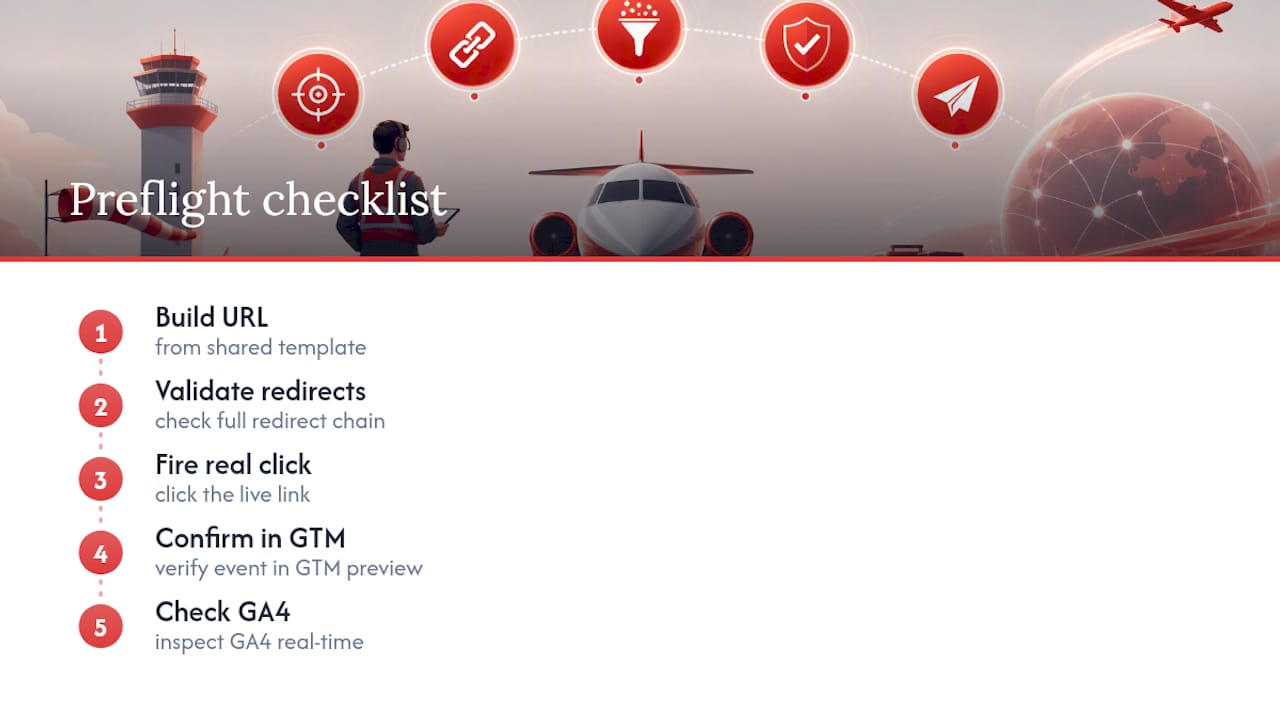
Team governance matters as much as the checklist. One central template, one naming convention, and one person owning final URL QA before launch. Post-campaign, reconciliation of X’s twclid-based click data against GA4 sessions separates raw reach from actual on-site conversions, which is where the real ROI conversation happens.
Why Most Teams Overthink UTM Setup and Underthink Validation
The technical part of Twitter UTM tracking isn’t hard. Five parameters, two medium values, one naming convention. Where campaigns actually fall apart is validation, or the total absence of it. Teams spend hours debating whether to use social or organic for the medium field and then launch a link nobody clicked in incognito mode first.
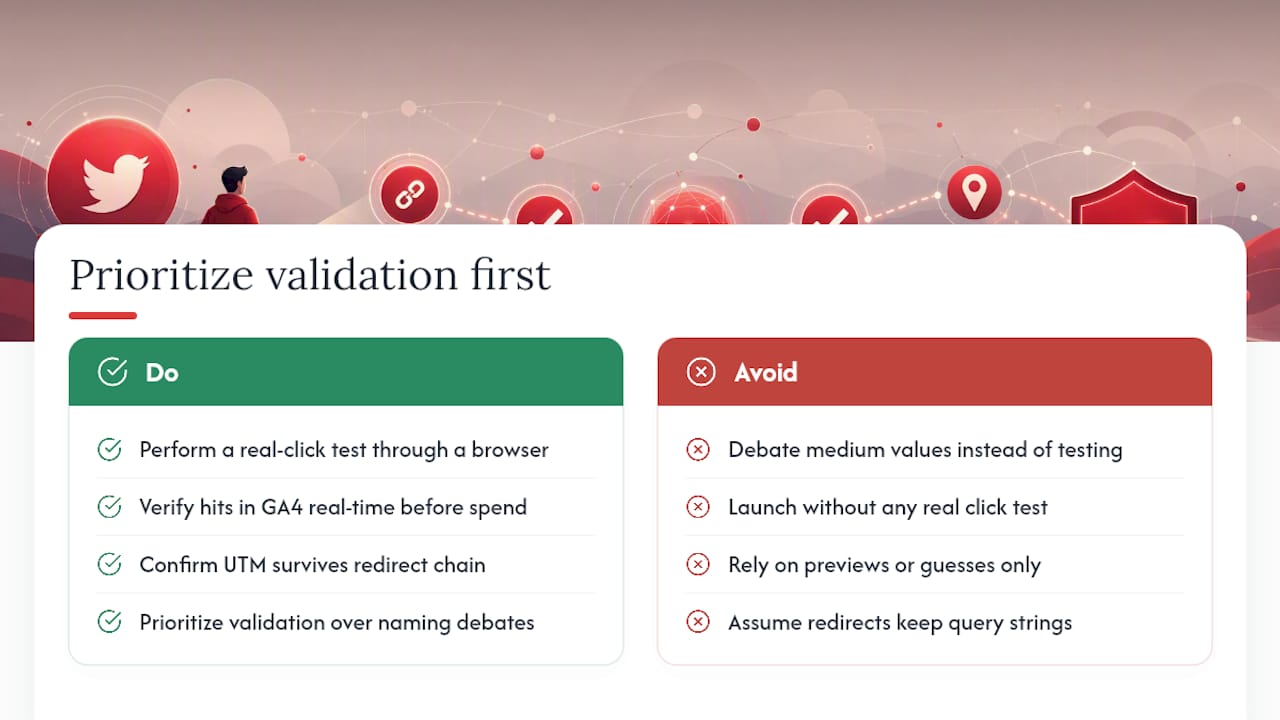
The conventional advice treats UTMs as a tagging exercise: pick your values, paste the link, done. That’s backwards. The tagging is trivial; the redirect chain is where things break, silently, for days, before anyone notices GA4 traffic doesn’t match ad spend. A CDN rule or a vanity domain redirect can erase a query string with zero error message, which means the first sign of trouble is a report that looks wrong three weeks into a campaign.
If there’s one thing worth prioritizing over everything else in this playbook, it’s the real-click test. Not a preview, not a guess, an actual click through an actual browser, checked against GA4 real-time before spend starts. Everything else, naming conventions, templates, reconciliation logic, only pays off if the tags survive the trip to your landing page in the first place.
— Knowix
How Tracking Is Handled So You Don’t Have To
Running high-scale X campaigns without validated tracking means you’re spending on reach you can’t actually measure. UTM governance and redirect-chain validation are built directly into campaigns, so the amplification numbers you see match what actually lands in your GA4 reports. For launches needing many creators moving quickly, timeline takeover campaigns come with the same preflight checklist covered above baked into setup, not bolted on after the fact.
If you’re scaling reach through organic post amplification or handing off day-to-day X account management entirely, the tagging and reconciliation work can be managed by an expert team. Request a pre-launch audit before your next campaign to get your UTM structure checked before a single dollar goes out the door.
Where to Verify This Yourself
For the underlying parameter definitions, UOregon’s UTM primer is the clearest baseline. For platform-specific redirect testing, review Missing Linkz’s validation guide and compare native ad metrics against site analytics using resources like FexAds’ frequency glossary for context on reporting gaps.
Sources
- X (Twitter) Ads UTM Tracking: The No-Macros Guide — UTM Generator
- twclid vs Manual UTM Parameters: Twitter/X Ads Tracking Guide | UTMGuard Blog
- What are UTM codes and how do I use them? - Digital Strategy
- UTM Tracking for X (Twitter) Ads: How to Build and Validate Campaign Links
FAQ
What Does UTM Tracking Mean?
UTM tracking means appending five standardized parameters, source, medium, campaign, content, and term, to a URL so analytics platforms like GA4 can identify exactly where a visit or conversion came from.
Can Someone Track My Location Through Twitter Links?
No. UTM parameters only pass campaign labels like source and medium; they carry no location or personal data and can’t be used to track someone’s physical location.
Is There a Free Tool to Track Twitter Analytics?
Yes. GA4 is free and reads UTM-tagged traffic once you filter Traffic Acquisition for twitter as the source, and several free UTM builder tools exist for generating consistent tagged links without a paid platform.
How Do I Track a UTM Link?
Build the tagged URL, click it yourself in an incognito window, then confirm it appears in GA4’s real-time report under the matching source and medium before trusting it for a live campaign.